Marketer Scorecard
What this is for
The Marketer Scorecard shows, for any period, what each marketer's ordering facilities sent in and what it has earned: orders, tests, charges, payments, adjustments, denied lines, today's A/R and the collection rate. It flags facilities whose orders dropped or whose denials are high, and shows how much has no marketer at all.
Before you start
- Billing → Dashboards → Financial → Marketer Scorecard.
- It appears for every user of a practice with Marketer Outreach on — no role setting is needed — and for nobody when Outreach is off.
- The numbers follow the marketer stored on each order, see how an order gets its marketer.
The top: period, date basis, actions
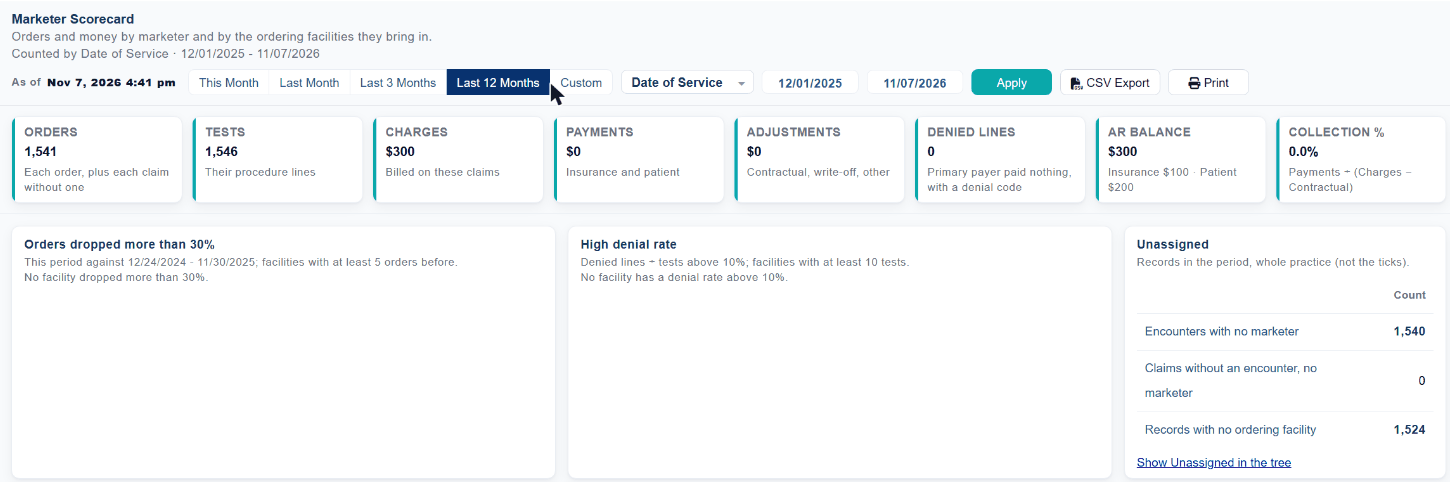
| Control | What it does |
|---|---|
| This Month · Last Month · Last 3 Months · Last 12 Months | reload at once. Last 3 Months runs from the 1st of the month three months back to today; Last 12 Months from the 1st of the month eleven months back to today |
| Custom | shows From / To; type both, then Apply |
| Date of Service / Billed Date / Payment Date | which date puts a record in the period — see the date basis |
| Apply | counts the ticked facilities in the tree (below) |
| CSV Export | the table as a CSV file: each facility, each marketer's subtotal and the Total |
| a PDF of what is on screen: Summary, By ordering facility and Month by month |
The line under the title says what is counted: Counted by Date of Service · 12/01/2025 - 11/07/2026. CSV Export and Print use what you last applied.
The cards
The eight cards add up every ticked facility: Orders (your practice's word for encounters), Tests, Charges, Payments, Adjustments, Denied Lines, AR Balance (with the insurance and patient parts) and Collection %. What each one counts is in the numbers.
Needs attention
| Panel | Lists |
|---|---|
| Orders dropped more than 30% | facilities whose orders fell more than 30% against the period just before (same length), among facilities with at least 5 orders before |
| High denial rate | facilities with more than 10% of their tests denied, among facilities with at least 10 tests |
| Unassigned | for the whole practice: orders with no marketer, claims without an order with no marketer, and records with no ordering facility. Show Unassigned in the tree ticks only those |
The tree and the table
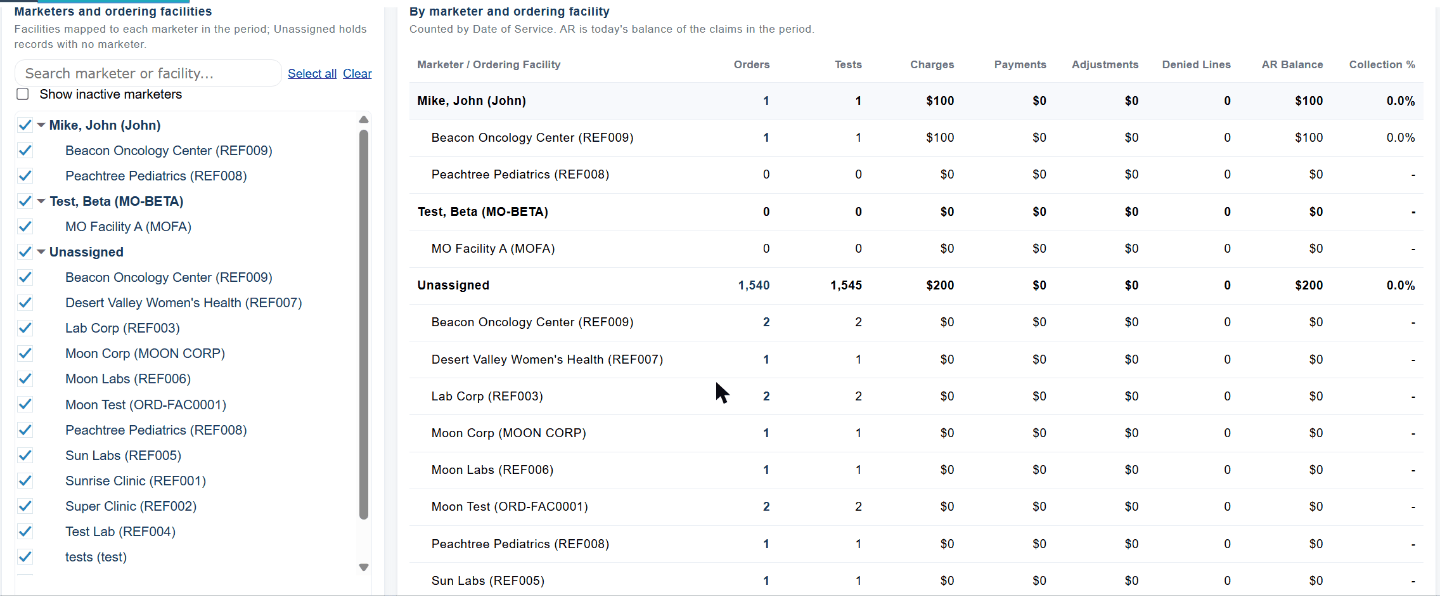
Marketers and ordering facilities lists every marketer with the facilities they had at any time in the period, plus any facility with orders stamped to them; Unassigned holds records with no marketer. Tick or untick facilities (ticking a marketer ticks all theirs), then click Apply. Use Search marketer or facility... to find one, Select all / Clear, and Show inactive marketers to add marketers who are no longer active.
By marketer and ordering facility shows a bold subtotal for each marketer, their facilities under it, and the Total. A ticked facility with nothing in the period shows zeros — that is how a lost account shows up.
Click an order count
The blue order counts open Search Encounter with those orders — the period and the marketer / facility already filled in. You need access to Search Encounter. Some counts are not links; hover over one to see why (for example, on Billed Date, or when the count includes claims that have no order).
Monthly trend and Month by month
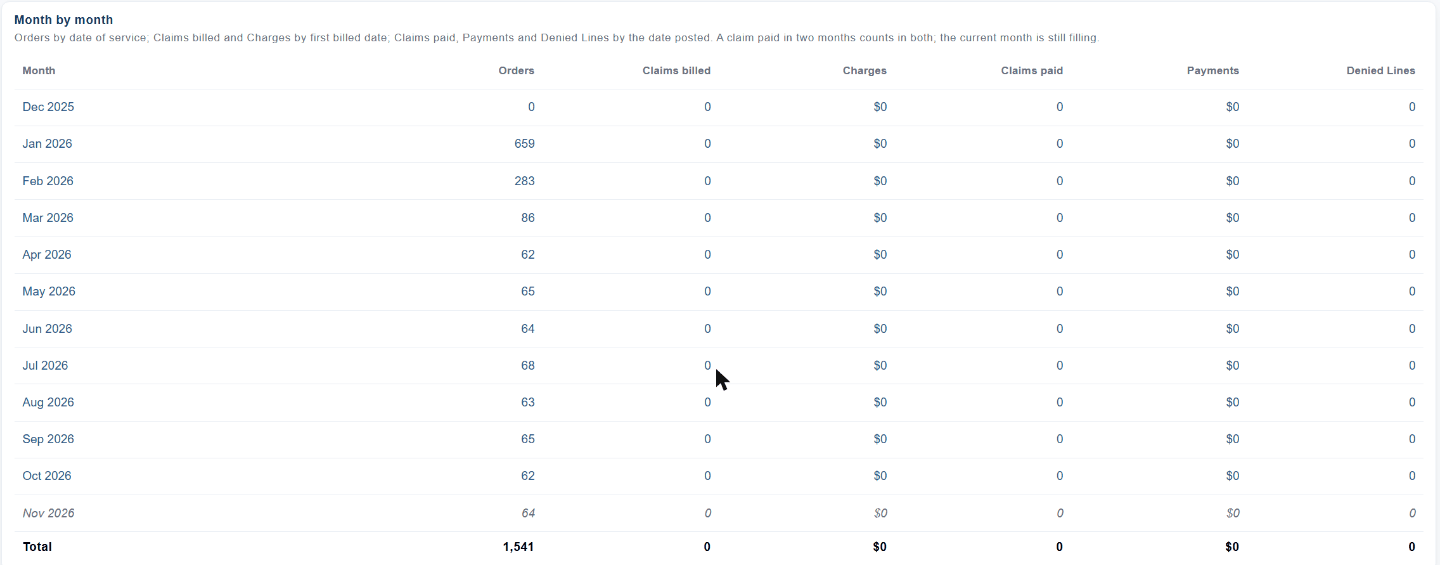
- Monthly trend shows orders and payments per month on the chosen date basis. A period shorter than six months is widened to six months so there is a trend to see.
- Month by month is different: each column uses its own date, whatever the date basis above — orders by date of service, Claims billed and Charges by first billed date, Claims paid, Payments and Denied Lines by posting date. A claim paid in two months counts in both. The current month is in grey because it is still filling.
Common problems
| You see | Why | What to do |
|---|---|---|
| The dashboard isn't in the menu | Marketer Outreach is off for the practice | ask your eClaim Pilot contact |
| No marketers yet. Add them in Admin → Practice → Outreach. | no marketers set up | an admin adds them (how) |
| Tick at least one ordering facility, then click Apply. | everything is unticked | tick facilities, Apply |
| Nothing to print. Tick at least one ordering facility, then click Apply. | nothing applied | as above, then Print |
| Enter both a From and a To date. | Custom with a date missing | fill in From and To, then Apply |
| The From date must be on or before the To date. | Custom dates the wrong way round | swap them |
| Enter the From and To dates as MM/DD/YYYY. | a Custom date is not a real date | retype it |
| A big Unassigned number | orders whose facility had no marketer on their date of service, or no facility at all | map the facilities, then Re-apply marketer on the Outreach tab (how) |
| Billed Date shows zero | nothing in the period has been billed (sent) yet | use Date of Service |
Related
- Marketer Outreach Report — the same figures as a PDF or CSV
- Ordering facilities and marketers
- Marketer Outreach overview