FTP Setup
What this is for
Claims, batch eligibility checks and their responses travel as files between eClaim Pilot and your clearing house, over SFTP (or FTP). FTP Setup is where you save the login for that server — its address, user name, password and port.
It is the first of three steps:
- FTP Setup — save the login (this page).
- Clearing House Setup — add the clearing house, and for each kind of file (claims, 835 payments, 999 and 277CA acknowledgements, eligibility) choose which FTP login to use and which folders to send to and read from.
- Send claims and eligibility checks.
One login can serve many kinds of file. Folders are not entered here — they belong to each section in Clearing House Setup.
Before you start
- Open it from the menu: Administration → FTP Setup.
- Ask your clearing house for the host name, user name, password, port and whether the connection is SFTP or FTP. Most clearing houses use SFTP on port 22.
- Logins belong to the practice you are working in. Each practice sets up its own.
- A demo practice cannot change FTP Setup — FTP setup cannot be changed for demo practices.
Reading the list

The list shows each saved login with its Host Name and Description. Type in the box above Host Name to narrow the list — it matches the start of the host name.
| Action | What it does |
|---|---|
| Click the Host Name, or Edit | Opens the login. You see View instead if you may only look. |
| Deactivate this item | Stops using the login. It stays in the list, greyed. |
| Delete | Removes it for good. Not allowed while a clearing house section uses it — deactivate it instead. |
| Event Log | Every change made to this login — who, when, what. |
Deactivating a login stops every section that uses it
A section whose login is inactive stops sending and receiving files (downloads simply skip it), with no warning at the moment you deactivate. Before deactivating, check Clearing House Setup for sections that use it, and switch them to the new login.
Steps: add a login
-
Click Add New FTP Server. FTP / SFTP Connection opens.
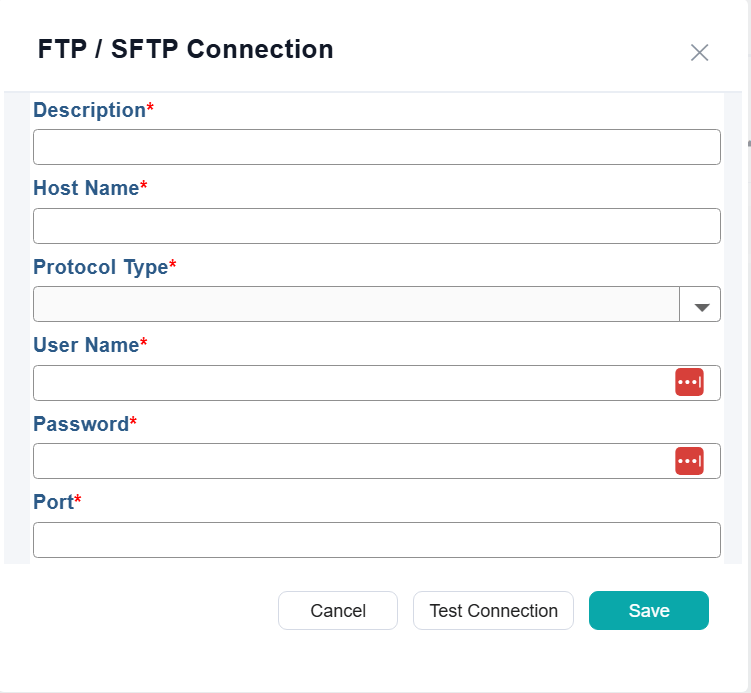
Every field is required. Test Connection tries the details before you save. -
Fill in every field:
Field What to enter Example Description A name you will recognise. Clearing House Setup lists logins by this name, and the EDI Files screen shows it as the file's Source. Availity SFTP – DemoPractice1 Host Name The server address only — no sftp://, no folder.sftp.clearinghouse.comProtocol Type SFTP or FTP, as the clearing house says. SFTP User Name The login they gave you. demo1_uploadPassword The password. It is hidden as you type, stored encrypted, and never shown again: a saved login shows Saved - leave blank to keep. Leave it blank to keep the saved password (Test Connection then uses it); type a new one to replace it. Port A number — usually 22 for SFTP, 21 for FTP. 22 -
Click Test Connection. It tries to log in with what is on the screen — you do not need to save first. successfully connected means the details are right.
- Click Save. Data Saved Successfully appears.
- Go to Clearing House Setup and choose this login on each section.
Use SFTP for files you receive
The job that fetches 835, 999, 277CA and eligibility response files from the clearing house reads SFTP logins only. An FTP login can be used for sending, but response files will not be picked up through it.
Changing a password
When the clearing house changes your password, open the login, type the new Password, click Test Connection, then Save. Every section using this login picks up the new password on its next run.
Not set up here
The upload of patient statements to a mailing company has its own connection, on Practice Setup → Statement Settings.
Common problems
| You see | Why | What to do |
|---|---|---|
| Enter Host Name, User Name, Password and Port before testing the connection. | A field is empty. | Fill all four, then test. |
| FTP Description cannot be empty (or Name(url), Type, User Name, Password, Port) | A required field is empty. | Fill it in. |
| Error in connecting sftp … UnknownHostException | The host name is wrong, or not reachable. | Check the spelling; no sftp:// or folder. |
| Error in connecting sftp … Auth fail / UserAuthException | The user name or password is wrong. | Re-type them; ask the clearing house to confirm. |
| Invalid Port : x | The port is not a number. | Enter 22 or 21, or what they gave you. |
| This record cannot be deleted because it is used in clearinghouse sections. | A section still uses this login. | Deactivate it, or move the sections to another login first. |
| This record cannot be added/updated because it already exists | The same host, user and description are already saved. | Edit the existing login. |