Marketer Outreach Report
What this is for
The Marketer Outreach Report prints or exports the same figures as the Marketer Scorecard, grouped three ways. All three give the same Total, and it equals the scorecard's for the same dates and date basis.
Before you start
- Billing → Reports → Financial Reports → Marketer Outreach Report. It needs the Reports right, and is shown only when Marketer Outreach is on for the practice.
- It works like the other reports: fill in the period, choose the grouping and the output, then Run now or Run in background (how reports work).
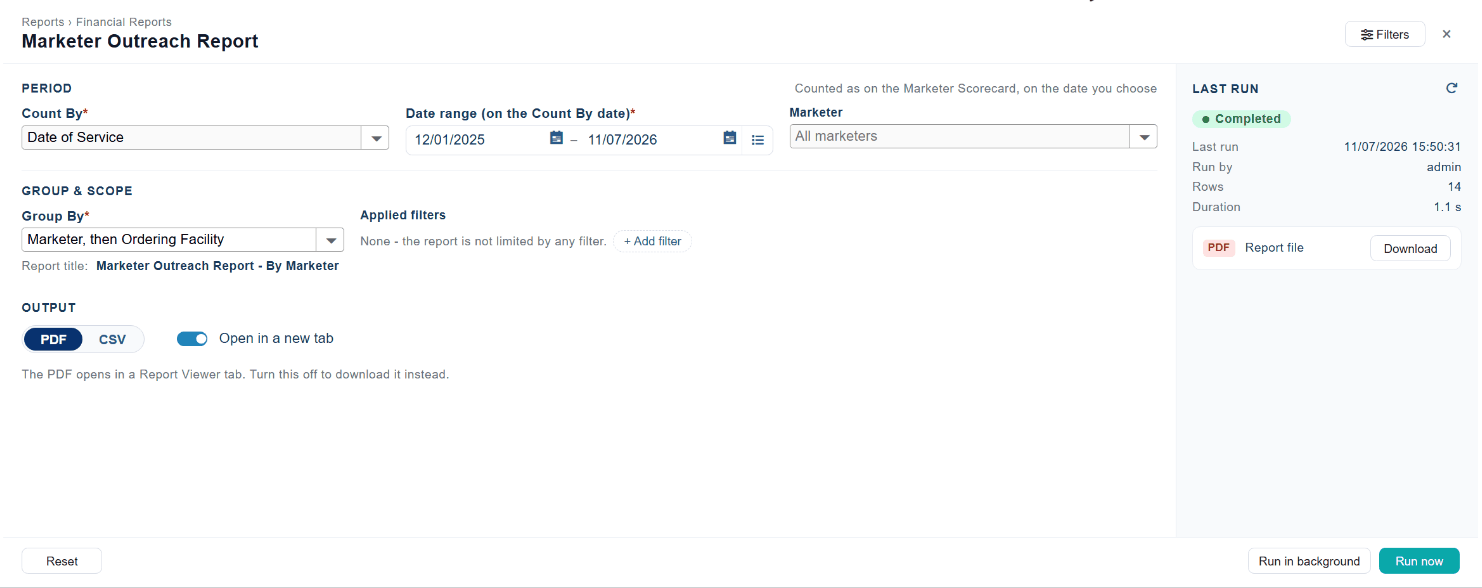
Period
| Field | What to enter |
|---|---|
| Count By * | the date basis: Date of Service, Billed Date or Payment Date — see the numbers |
| Date range (on the Count By date) * | From and To; the list icon offers quick ranges. Opens on the last 12 months |
| Marketer | leave All marketers, or pick one to count only what belongs to them |
Group By
| Group By | Each line is | Notes |
|---|---|---|
| Marketer, then Ordering Facility | a marketer's subtotal in bold, then their ordering facilities | then Unassigned for records with no marketer. Portrait PDF |
| Ordering Facility | one ordering facility, with its Current Marketer | a facility that changed marketer in the period is listed once, under today's marketer, with was … until …. Active facilities with nothing in the period show zeros. Most orders first, (no ordering facility) last. Landscape PDF |
| Ordering Provider | one ordering (referring) provider — the outside doctor who sent the order — with their NPI | taken from the Referring Provider on the order or claim. Records with none are one line, (no ordering provider), last. Landscape PDF |
Example
Last 12 months by Date of Service, the practice has 1,541 orders. Marketer, then Ordering Facility shows Mike, John with 1 order and Unassigned with 1,540; Ordering Facility shows Beacon Oncology Center with 3 orders under Mike, John (1 counted to John, 2 entered before it was mapped); Ordering Provider shows each referring doctor and (no ordering provider). Each one's Total is 1,541.
Filters (top right) adds an Ordering Facility filter: choose one or more facilities and only their records are counted. It shows as a chip under Applied filters.
Output and running
- PDF opens in a Report Viewer tab (or downloads, with Open in a new tab off). CSV always downloads: the period and date-basis lines, then the columns and every line with the Total.
- Run now makes the file straight away. Run in background builds it while you work; the file then appears on the Last run card — click the refresh icon. Background runs are listed in Job Monitor as Marketer Outreach Report (Manual).
- Reset clears the dates, the marketer and the filters.
Common problems
| You see | Why | What to do |
|---|---|---|
| The card isn't on the Reports page | no Reports right, or Marketer Outreach is off | ask your administrator |
| From and To dates are required. | a date is empty (Reset empties them) | fill in both dates |
| No records found for selected criteria | nothing in the period for that marketer / facility | widen the period or clear the filters |
| Mostly (no ordering provider) | orders don't carry a Referring Provider | enter the referring provider on orders and claims |
| Totals differ from the scorecard | a different period, date basis or filter | use the same dates and Count By as the scorecard's date basis |