Provider List
Under Master Setup → General Setup → Provider List. For which provider is which, see Providers.
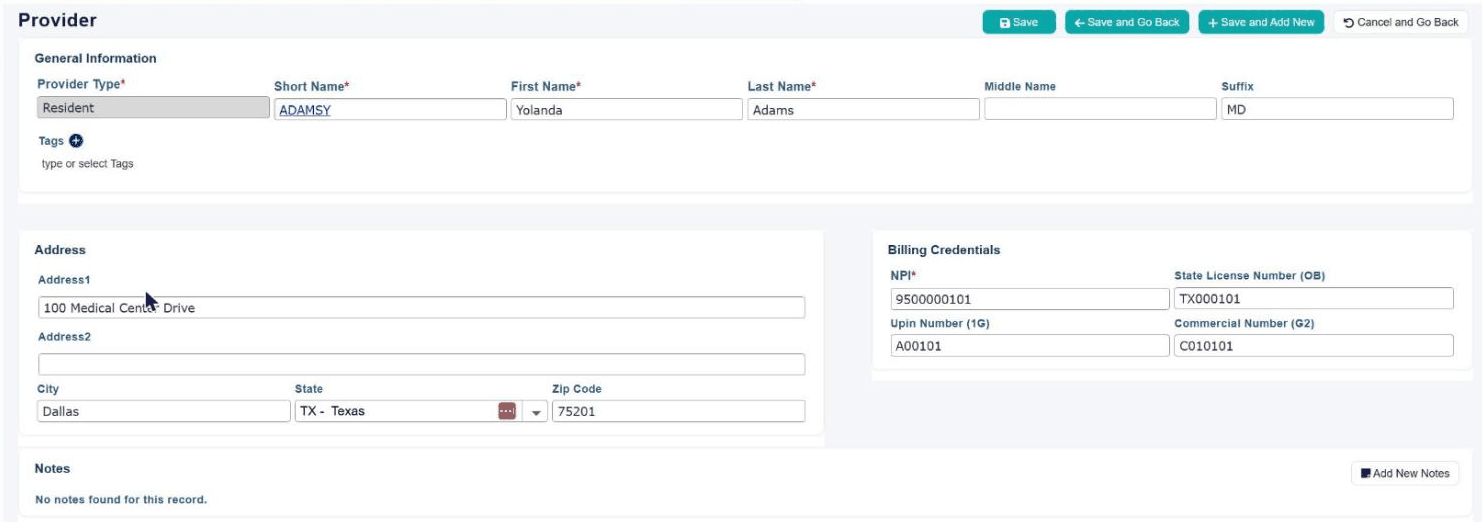
Provider List holds the other people who can appear on a claim. Pick the Provider Type first:
| Provider Type | Chosen on the claim as |
|---|---|
| Resident | Resident Provider |
| Assistant | Provider Assistant |
| Supervising | Supervising Provider |
| Ordering | Ordering Provider |
The same doctor can be added once per type. These are recorded on the claim and encounter; they are not sent to payers yet.
Common problems
| You see | Why | What to do |
|---|---|---|
| Invalid NPI. NPI must be 10 digits. / NPI must be numeric and 10 characters. | The NPI is not 10 digits. | Check it on the NPI registry. |
| A Provider with NPI 'X' already exists. | That NPI is already on file. | Use the existing record. |
| Short Name cannot be empty (company is configured for manual short name entry). | Your practice types short names. | Type one. |
| This record cannot be deleted because it is used in Claims | Claims use this provider. | Deactivate it instead. |