Create Group Claims
What this is for
Create Group Claims makes one claim for each of many patients who received the same service — straight away, without encounters. Everything on each claim comes from a claim macro; only the date of service (and the macro) can differ per patient. The claims are priced from your fee schedule and, where the payer allows, queued to send by EDI.
Prefer encounters first (to review before billing)? Use Create Group Encounters, then Create Claim by Encounter.
Before you start
- A claim macro for the service, with its providers, facility, place of service, diagnosis codes and lines — Claim macros.
- A price for every procedure in the macro — Procedure codes.
- Optionally a Patient Group — see Patient groups.
- Open Claims → Create Group Claim.
Practices that number claims by hand
If your practice types claim numbers (Practice Setup → Auto Generate, Claim Number = MANUAL), the list has a Claim # column: type a number on every row. Generate refuses a missing number, the same number on two rows, or a number another claim already uses — the row's box turns red and the Summary shows Missing Claim #.
Steps
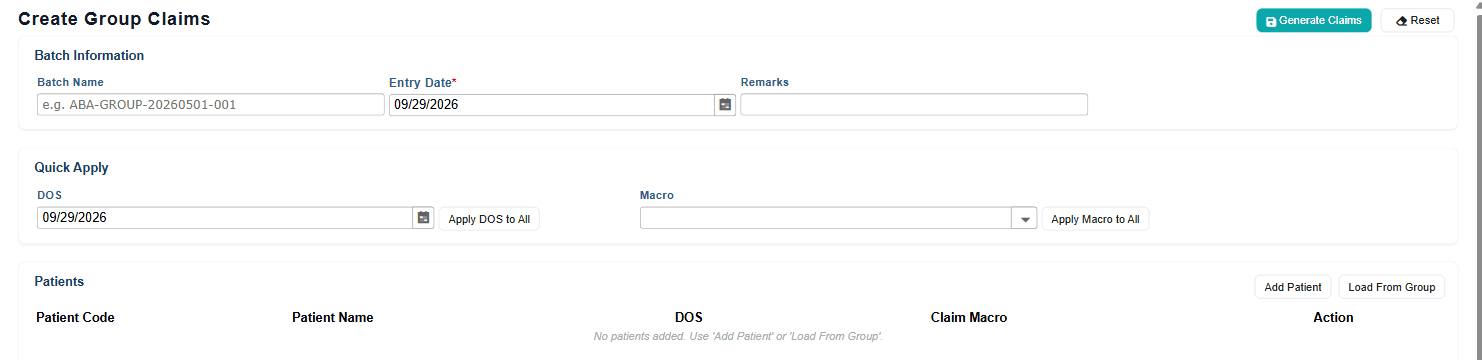
- Batch Information: type a Batch Name (required), check the Entry Date, add Remarks if you like.
- Add patients with Load From Group (a whole Patient Group) and/or Add Patient (one at a time). A patient is listed once.
- Quick Apply: choose the DOS → Apply DOS to All, the Macro → Apply Macro to All (only active macros are listed).
- Change the DOS or Claim Macro on any row that differs.
- Check the Summary (Missing DOS, Missing Macro, Ready), then click Generate Claims. The claims are created in the background — Create Group Claim job scheduled successfully … Please check the Group Claim History for Job Status.
Example
A school vision screening on 09/30 for 40 students: Batch Name LINCOLN-VISION-0930, Load From Group Lincoln 3rd Grade, DOS 09/30 Apply DOS to All, Macro Vision Screening Apply Macro to All, Generate Claims. Each student gets a claim, priced from the fee schedule, and those whose insurance takes electronic claims are queued in the EDI Transmission Queue.
What each claim gets
- From the macro: providers, facility, ordering facility, referral source, place of service (11 if the macro has none), diagnosis codes, and the lines with their units, modifiers and diagnosis pointers.
- Price: each line from Procedure codes — the Fee List row for the patient's payer group, else the standard fee (the Self Pay fee when billed to the patient).
- Bill To: the primary insurance of the patient's Default insurance profile (the oldest active profile if none is named Default) — not a newer profile added later; with no primary on that profile, Self — the claim is still created.
- Status: ClaimCreatedIns or ClaimCreatedSelf. Claim number from your automatic numbering, or the Claim # you typed.
- Queue: EDI when the primary payer's Claim Transmission Allowed is Yes (Payers); otherwise not queued — queue them from Manage Claim.
Every procedure needs a price
If a procedure in the macro has no price for a patient, that patient gets no claim: the row fails with Claim not created: no price found for procedure …. The other patients' claims are created as normal. Set the price, then use Re Use History, set the batch's original DOS and click Apply DOS to All — patients already done are skipped as duplicates and the failed ones are created.
Group Claim History
Claims → Group Claim History lists each batch with Total, Success, Failed, Skipped and Status (PENDING, PROCESSING, COMPLETED, PARTIAL, FAILED). More Actions on a batch: View Details (each patient's row, Claim #, Status and Message), Claim Details (the batch's claims in Manage Claim) and Download Log.
| Row status / message | Meaning | What to do |
|---|---|---|
| SUCCESS — Claim created successfully | created | — |
| SKIPPED — Duplicate skipped. Claim 00017 already exists for patient P0012 on 09/06/2026 with the same facility, rendering provider and billing provider. | that claim matches this row the way Claim entry checks for a duplicate: same patient, DOS, facility, rendering and billing provider. A claim for the same day at another facility or with another provider does not stop the row | nothing — open the named claim if in doubt |
| FAILED — Unable to build claim packet | the patient or macro was not found, the macro has no lines, or no DOS | Download Log for the reason; fix the macro |
| FAILED — Billing Provider is required for claim. (or Rendering Provider, ICD, line checks) | the macro is missing it | complete the macro and run again |
| FAILED — Claim not created: no price found for procedure 97153 (date of service …). Set the price … | no price for that procedure for this patient — no Fee List row for their payer group, and a standard price of 0.00 | set the price on the procedure's Fees tab (or add a Fee List row), then Re Use History with the original DOS |
Re Use History (in View Details) opens the screen again with the same patients and macros. Every row starts on today's date and Remarks is blank — change the DOS with Apply DOS to All if the session was another day.
Common problems
| You see | Why | What to do |
|---|---|---|
| Please add at least one patient before generating claims. | The list is empty. | Add patients or load a group. |
| Batch Name is required. | No batch name. | Type one. |
| Row N: DOS is required. / Row N: Claim Macro is required. | A row is incomplete. | Fill it, or use Quick Apply. |
| Row N: DOS cannot be in the future (…) | A claim is not created for a date that has not happened yet. | Change that row's DOS to the day of the service. |
| Row FAILED — Claim not created: no price found for procedure … | No price for that procedure for this patient. | Set the price, then Re Use History with the original DOS. |
| Older claims with $0.00 lines (created before 30-Sep-2026) | No price at the time. | Add the price, then run Reprice CPT from Fee Table in Claim Bulk Update. |
| Claims not in the EDI queue | The payer's Claim Transmission Allowed is not Yes, or billed to Self. | Queue them with Bulk Update → Add To Transmission. |
| Nothing appears after Generate | It runs in the background. | Open Group Claim History. |