Patient Referrals
What this is for
Many plans (HMOs, Medicaid managed care) pay a specialist only if the patient's primary care doctor has sent a referral: a number, a date range and a number of visits. A claim without a valid referral is denied. Patient Referrals keeps each referral, counts the visits used, warns when one is running out, checks every encounter and claim against it, and sends its number on the claim (837 REF*9F, CMS-1500 box 23).
A patient referral is not a Referral Source (where a patient came from) — see Facilities and referral sources — nor a payer's prior authorization — see Patient Authorizations.
Where referrals are kept
| Where | What you see |
|---|---|
| Patient → Patient Referral | all referrals of the practice |
| Patient Setup → Referrals tab | one patient's referrals — Add New Referral here |
| Patient Summary | a Referrals card |
| Encounter and Claim screens | the Referral field, and a banner when something is wrong |
Which plans need a referral
- On the payer: Claim Rules → Referral Required = Yes (Payers).
- On a patient's insurance: Referral Required — Follow payer, Yes or No — overrides the payer for that patient's plan.
The referral list
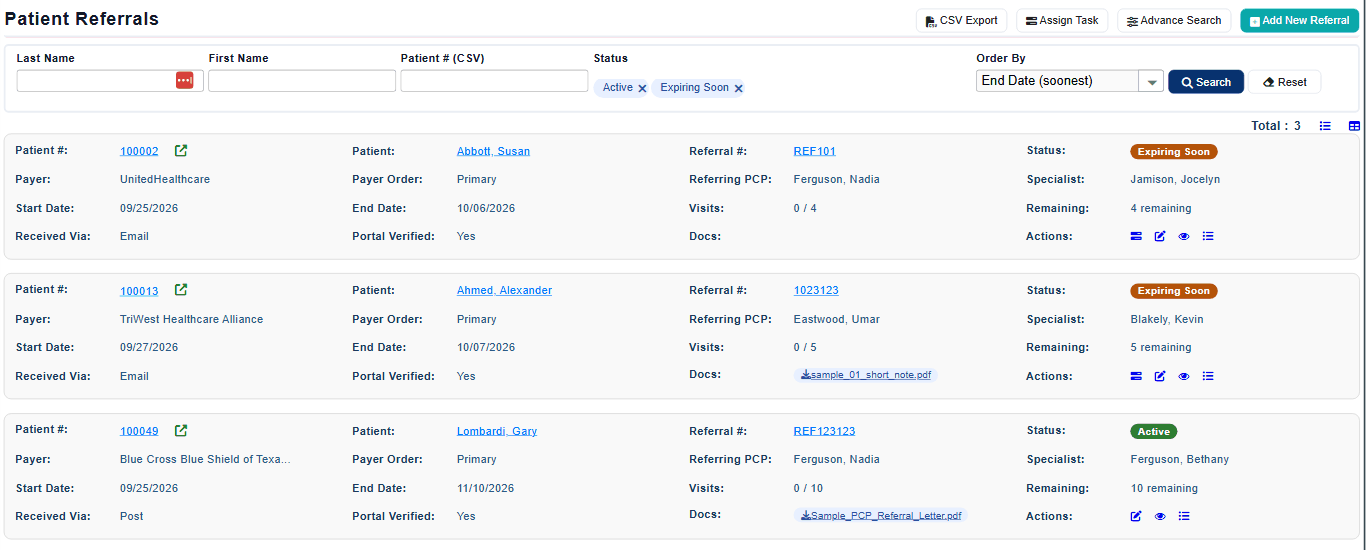
Search by name, Patient # or Status; Advance Search adds dates, Expiring within (days), referral #, received via, portal verified, payer, PCP and specialist. Order By defaults to End Date (soonest) — the ones to renew first.
Status
Worked out every day from the dates and visits:
| Status | When |
|---|---|
| Cancelled | you set it to Cancelled |
| Expired | today is after the End Date |
| Used Up | every allowed visit has been used |
| Not Yet Valid | today is before the Start Date |
| Expiring Soon | ends within the practice's warning days, or few visits left (Practice Setup → Referral Settings: 14 days / 1 visit by default) |
| Active | none of the above |
Visits used counts the encounters linked to the referral, one per date of service — two encounters on the same day are one visit.
Steps: add a referral
- Open the patient (Patient Setup → Referrals) and click Add New Referral — or use Add New Referral on the list and pick the patient. The patient needs an insurance profile first.
-
Fill in the referral:
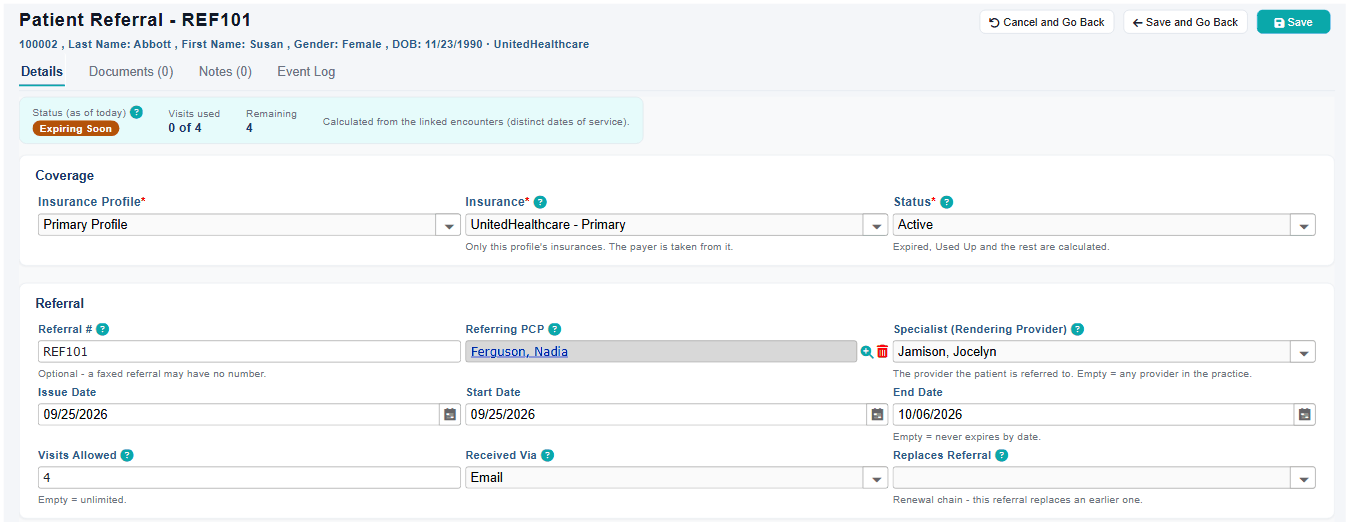
Field What to enter Example Insurance Profile, Insurance the plan the referral is for — it starts on the patient's Default profile Primary Profile · UnitedHealthcare - Primary Status Active (or Cancelled) — the rest is worked out Active Referral # the number on the referral — optional, a faxed one may have none REF101 Referring PCP the primary care doctor who referred Ferguson, Nadia Specialist (Rendering Provider) the provider the patient is referred to — empty means any Jamison, Jocelyn Issue Date, Start Date, End Date the dates on the referral — no End Date means it never expires by date 09/25 – 10/06 Visits Allowed empty means unlimited 4 Received Via Fax, Email, Post, Payer Portal, EHR Email Replaces Referral for a renewal, the referral it replaces Verified on the payer portal tick once checked on the payer's site -
Save. Documents (the faxed referral, a portal printout) and Notes open after the first save.
Referrals on encounters and claims
On an encounter or claim, the Referral field lists the referrals of the chosen insurance profile — e.g. REF101 · Active · 09/25 – 10/06, with Fits this visit on the ones that match.
- On a new encounter, when exactly one referral fits (same plan, date of service in range, a visit left, the right specialist), it is linked automatically — ✓ Linked automatically. With several, you pick one. Choose - None - to stop the automatic link.
- A linked referral fills the Referral # and, if empty, the Referring Provider.
- If you correct the number on the referral later, linked claims use the new number the next time they are sent or printed, and show it when opened — no need to re-save them. Claims already sent went with the old number; send a corrected claim if the payer needs it.
- You can also just type a Referral # without a tracked referral.
The referral banner
eClaim Pilot checks the referral against the date of service:
| Finding | Banner text | Blocks? |
|---|---|---|
| Missing | {Payer} requires a referral - none is linked or entered. | yes |
| Cancelled | Referral X is cancelled. | yes |
| Out of range | DOS … is outside referral X (start - end). | yes |
| Exceeded | This is visit 5 of 4 allowed on referral X. | yes |
| Wrong insurance | Referral X is for {payer}, which is not on this insurance profile. | yes |
| Not the referral's specialist / PCP | Referral X is to …; the rendering provider is … | warning only |
A blocking finding shows the red banner Referral problem - this claim may be denied; warnings show the amber Referral - please check. Encounters can always be saved. A claim with a blocking finding cannot be created, or sent (EDI or paper), unless the user has Can Create Claim On Referral Issue / Can Transmit Claim On Referral Issue — it is listed in the scrubbing Claim Error List and in the Alert Center under Referral problem.
Example
Susan's UnitedHealthcare referral REF101 allows 4 visits from 09/25 to 10/06. Her fifth visit on 10/03 shows This is visit 5 of 4 allowed on referral REF101, and the claim stays out of the EDI batch. Ask the PCP for a renewal; add it as a new referral with Replaces Referral = REF101, link it on the encounter, and the claim can go.
Renewals
A referral that is Expiring Soon, Used Up, or Expired in the last 30 days — and is still needed (visits used, or an unbilled encounter on that plan) — gets a Referral Renewal task every night, for the user group set in Referral Settings (Check now runs it at once). It is also listed in the Alert Center under Referrals expiring (Alert Center settings).
To renew: add the new referral with Replaces Referral set to the old one. The renewal task closes and the old referral leaves the Alert Center.
Common problems
| You see | Why | What to do |
|---|---|---|
| Add an insurance profile to this patient before adding a referral. | No insurance profile. | Add the patient's insurance first. |
| Referral # X already exists for this patient and insurance profile. | Entered twice. | Edit the existing one. |
| Referral Start Date cannot be after the End Date. | Dates swapped. | Correct them. |
| This referral is linked to an encounter or claim and cannot be deleted. | It is in use. | Set its status to Cancelled instead. |
| The selected referral does not belong to this patient and insurance profile. | Wrong plan on the encounter/claim. | Pick a referral of that profile. |
| Referral problem (…); you do not have permission to transmit claims with a referral problem. | A blocking finding on the claim. | Fix the referral, or ask for the permission. |
| A referral is not in the list | The list opens on Active and Expiring Soon. | Change Status — e.g. add Not Yet Valid or Expired. |