My Scorecard (Outreach app)
What this is for
The Outreach app is a separate sign-in for marketers. It shows one page, My Scorecard: the orders, tests and money from your ordering facilities only — never another marketer's, and nothing about the rest of the practice. It works on a laptop, an iPad and a phone.
Before you start
- Your practice gives you a user name (your email address) and a temporary password — by email or in person. If you have none, ask the practice's administrator.
- Open the Outreach link from the email, or the address your practice gives you (it ends in
/outreach/).
Sign in
- Type your User name and Password, then Sign in.
- The first time (and after the practice resets your password) you are asked to Set your password before you see anything: type it twice and Save.
- Your scorecard opens.
A password needs at least 10 characters, with an uppercase letter, a lowercase letter, a number and a special character, and must differ from the current one.
If sign-in fails you always see the same message, Sign-in failed. Check your user name and password. — whatever the reason (a wrong password, a login that is switched off, or access that has ended). If your password is right and it still fails, ask the practice.
Forgot your password?
- Click Forgot password?, type your User name and Send link.
- If that user name is an Outreach login with an email on file, an email comes with a link. The link works for 15 minutes.
- Open it, type a New password twice and Save password, then sign in with it.
If the link has expired you'll see This reset link is invalid or has expired. Please request a new one. — use Request a new link.
Your scorecard
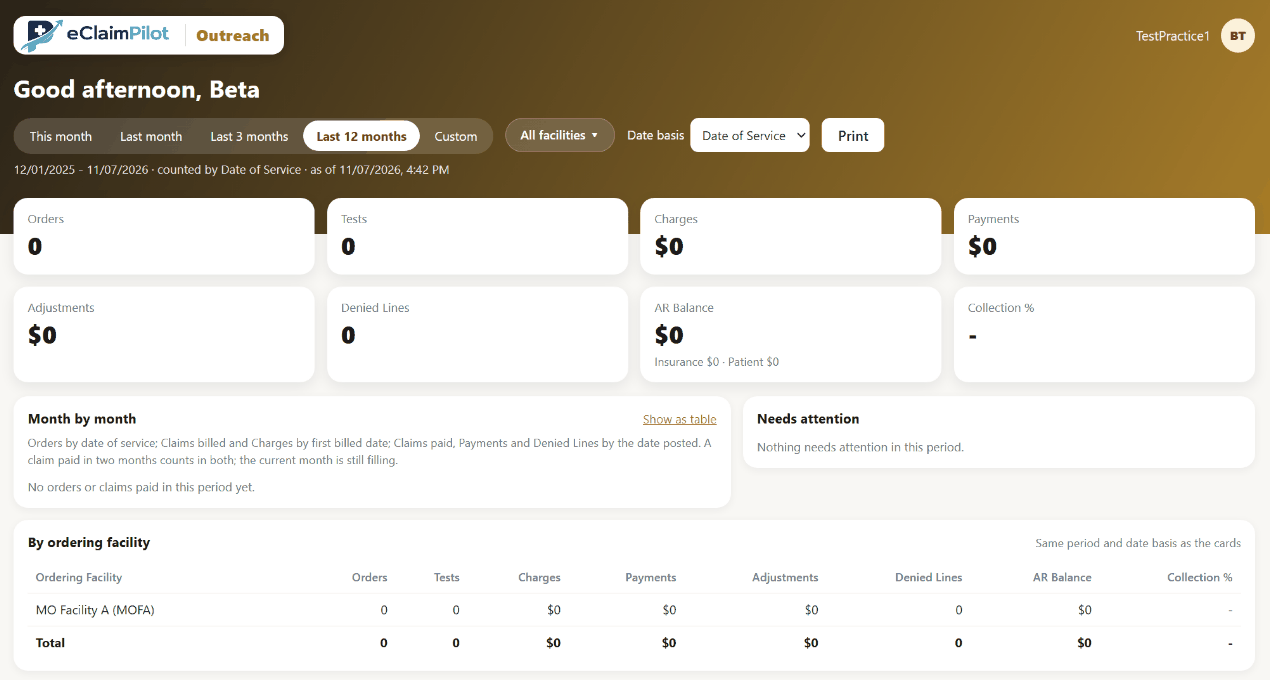
| Control | What it does |
|---|---|
| This month · Last month · Last 3 months · Last 12 months · Custom | the period; it opens on Last 12 months. Custom shows From / To and Go |
| All facilities | choose which of your ordering facilities to count; tick them and Apply |
| Date basis | Date of Service, Billed Date or Payment Date — which date puts a record in the period |
| a PDF of your scorecard in a new tab (or a download, if the browser blocks the tab) |
The line under them says exactly what is shown, e.g. 12/01/2025 - 11/07/2026 · counted by Date of Service · as of 11/07/2026, 4:42 PM.
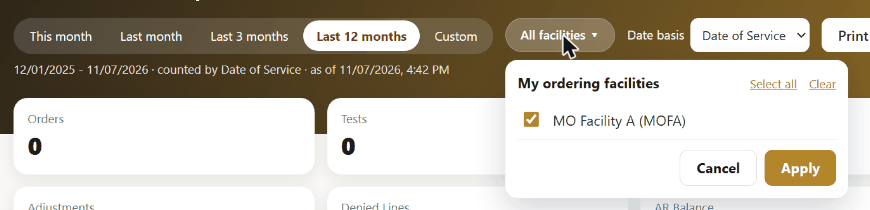
| Part | Shows |
|---|---|
| The eight cards | Orders, Tests, Charges, Payments, Adjustments, Denied Lines, AR Balance (insurance and patient), Collection % |
| Month by month | a chart of orders and claims paid each month (Show as table for the numbers). Each column uses its own date: orders by date of service, claims billed by billed date, payments by posting date. The current month is marked (so far) |
| Needs attention | your facilities whose orders dropped more than 30% against the previous period, or with more than 10% of lines denied |
| By ordering facility | each of your facilities and the Total, for the same period and date basis as the cards |
Which facilities are mine?
The facilities the practice mapped to you during the period, plus any whose orders were counted to you. If one is missing or wrong, ask the practice — they manage the mappings.
Your menu
Click your initials (top right):
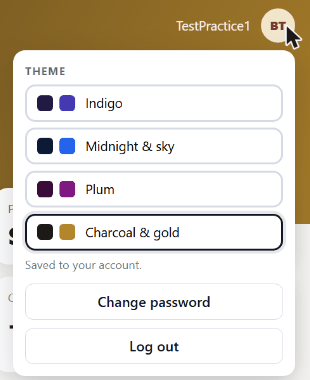
- Theme: four colour schemes; your choice is saved to your account and follows you to other devices. The menu says Saved to your account., or Not saved to your account. when the save failed: the colours then stay on this screen only, so pick the theme again later.
- Change password: your current password, then the new one twice.
- Log out: signs you out of this browser.
You stay signed in for up to 5 hours, even if you close the tab; after that you are asked to sign in again.
Common problems
| You see | Why | What to do |
|---|---|---|
| Sign-in failed. Check your user name and password. | wrong password — or your login is off or outside its access dates | try Forgot password?; if that doesn't help, ask the practice |
| Your session has ended. Please sign in again. | you were signed in for more than 5 hours | sign in again |
| Your access has ended. Sign in again or contact the practice. | the practice switched your login off, or your access dates are over | ask the practice |
| No facilities are assigned to you in this period. | nothing is mapped to you for these dates | try a longer period, or ask the practice |
| No facility is ticked for this period. | you unticked every facility | open All facilities, tick some, Apply |
| This period cannot be shown — The From date must be on or before the To date. | Custom dates the wrong way round | swap the dates and press Go |
| This period cannot be shown — Enter both a From and a To date. | a Custom date is missing | fill in both, then Go |
| Your scorecard could not be loaded | the connection dropped | check your connection and press Try again |
| The PDF could not be made. Try again. | the page wasn't loaded, or nothing is ticked | wait for the numbers, tick facilities, try again |
| The reset email never came | the user name isn't an active Outreach login with an email | ask the practice to Reset password for you instead |
Related
- Marketer Outreach overview
- Marketers and Outreach logins — for the practice's administrator