Alert Center
What this is for
The Alert Center gathers the work that has stopped moving: encounters and claims on hold, claims never sent, rejections not resent, self-pay balances with no statement, receipts not applied, referrals running out, failed imports and jobs, overdue tasks. For each item it shows how long it has been stuck and lets you record what you did.
Which alerts appear, and after how many days, is set per practice in Alert Center settings — every alert type is explained there.
Before you start
- Open it from the menu: Administration → Alert Center.
- Everything is worked out live when you open it or click Refresh — there is nothing to run.
Reading the screen
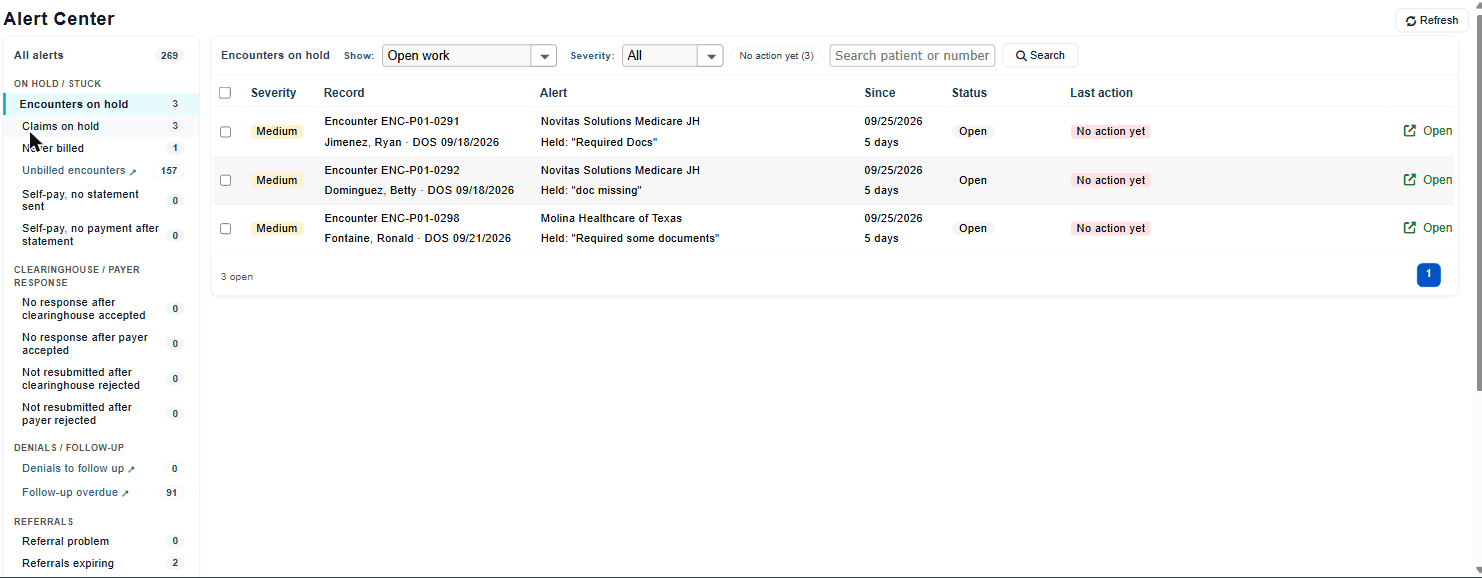
On the left, each alert type with its count of open items, grouped as in the settings. A grey +n counts items you have hidden (No action needed or Archived). All alerts is the total. A type with ↗ is a link: its count comes from another screen, and clicking it opens that screen already filtered (for example Unbilled encounters → Manage Encounter).
On the right, the items of the selected type, most severe and oldest first:
| Column | What it shows |
|---|---|
| Severity | High, Medium or Low, from how long the item has been stuck |
| Record | the claim, encounter, referral or receipt, with the patient and DOS |
| Alert | the payer and amount, and why it is listed — e.g. Held: "Required Docs" |
| Since | when it got stuck, and for how many days |
| Status | your work status on it |
| Last action | the latest note since it was listed — or No action yet |
| Open | opens the record's summary in a new tab; the Alert Center stays open |
Narrow the list with Show (Open work by default, or a single status, Hidden, All), Severity, the No action yet chip (items nobody has touched), or Search patient or number.
What each alert looks like
One example row for every alert type, as the list shows it. The Alert column has two lines: first the payer and amount, then why the item is listed. The alert's own name is on the left and at the top of the side panel, so the second line gives only the cause. For example, a Referral problem row says just Out of range.
The examples were viewed on 10/20/2026 with the default settings. When each alert appears and when it turns Medium or High is explained in Alert Center settings.
On hold / stuck
| Alert | Severity | Record | Alert column | Since |
|---|---|---|---|---|
| Encounters on hold | Medium | Encounter ENC-1042 Smith, John · DOS 10/08/2026 |
Payer ABC Held: "waiting for auth" |
10/15/2026 5 days |
| Claims on hold | Low | Claim CLM-2210 Brown, Mary · DOS 10/01/2026 |
Payer ABC · $250.00 Held: "Required Docs" |
10/18/2026 2 days |
| Never billed | High | Claim CLM-2188 Lee, Anna · DOS 09/18/2026 |
Payer ABC · $180.00 Created 09/20/2026 - never sent |
09/20/2026 30 days |
| Self-pay, no statement sent | Medium | Claim CLM-2150 Garcia, Luis · DOS 10/05/2026 |
Self · $80.00 Created 10/06/2026 - no statement sent |
10/06/2026 14 days |
| Self-pay, no payment after statement | High | Claim CLM-1990 Patel, Ravi · DOS 07/30/2026 |
Self · $120.00 Last statement 08/15/2026 - no patient payment since |
08/15/2026 66 days |
An encounter has no amount, so its first line is the payer only. A hold with no hold note shows No reason recorded. On self-pay rows the amount is what the patient owes.
Clearinghouse / payer response
| Alert | Severity | Record | Alert column | Since |
|---|---|---|---|---|
| No response after clearinghouse accepted | Medium | Claim CLM-2101 Kim, Grace · DOS 09/25/2026 |
Payer ABC · $450.00 Clearinghouse accepted (999) 10/01/2026 |
10/01/2026 19 days |
| No response after payer accepted | Medium | Claim CLM-2044 Davis, Paul · DOS 09/02/2026 |
Payer ABC · $300.00 Payer accepted (277CA) 09/10/2026 |
09/10/2026 40 days |
| Not resubmitted after clearinghouse rejected | Low | Claim CLM-2215 Wilson, Kate · DOS 10/10/2026 |
Payer ABC · $175.00 Clearinghouse rejected (999) 10/18/2026 |
10/18/2026 2 days |
| Not resubmitted after payer rejected | Medium | Claim CLM-2190 Moore, Ann · DOS 10/06/2026 |
Payer ABC · $220.00 Payer rejected (277CA) 10/15/2026 - Invalid subscriber id |
10/15/2026 5 days |
Only the payer rejection carries a description: it is the payer's own words from the 277CA. Click the row and the side panel's Where the claim is shows each step since the claim was billed.
Referrals
| Alert | Severity | Record | Alert column | Since |
|---|---|---|---|---|
| Referral problem | High | Claim CLM-2230 Nguyen, Tom · DOS 10/14/2026 |
Payer ABC · $200.00 Out of range |
10/16/2026 4 days |
| Referrals expiring | Medium | Referral R-5521 Nguyen, Tom |
Payer ABC Expiring Soon · 3 of 10 visits used · ends 10/31/2026 |
10/17/2026 3 days |
- Referral problem lists the claim. The second line names every blocking finding, separated by commas: Missing, Cancelled, Out of range, Exceeded, Wrong insurance. For example Missing or Out of range, Exceeded. The side panel's findings explain each one in a sentence, the same as the claim's red referral banner.
- Referrals expiring lists the referral. The second line is its status (Expiring Soon, Used Up or Expired), the visits used and the end date. A referral with no visit limit shows unlimited visits. Since is when it reached that status: the days before end from Referral Settings (10/17 for a referral ending 10/31 with 14 days), the day after it expired, or the last visit that used it up.
Authorizations
| Alert | Severity | Record | Alert column | Since |
|---|---|---|---|---|
| Authorization problem | High | Claim CLM-2241 Hall, Ruth · DOS 10/15/2026 |
Payer ABC · $160.00 Exceeded |
10/16/2026 4 days |
| Authorizations expiring | Medium | Authorization AUTH-7781 Hall, Ruth |
Payer ABC Expiring Soon · 97110 · 10 of 12 visits used · ends 12/31/2026 |
10/14/2026 6 days |
- Authorization problem works like Referral problem. Its findings are Missing, Cancelled, Denied, Out of range, Exceeded and Wrong insurance.
- Authorizations expiring names the service that gave the status, with its usage, then the end date.
Payments
| Alert | Severity | Record | Alert column | Since |
|---|---|---|---|---|
| Patient receipt not applied | Medium | Receipt RC-3305 Clark, Jane |
Card · $50.00 Received 10/12/2026 - not applied, the patient owes |
10/12/2026 8 days |
| Insurance balance, no next insurance | Low | Claim CLM-2077 Young, Mark · DOS 09/15/2026 |
Payer ABC · $150.00 Insurance payment posted 10/02/2026 - insurance balance left, no next insurance to bill |
10/02/2026 18 days |
On a receipt, the first line is the payment method and the amount not yet applied. On Insurance balance, no next insurance, the amount is the insurance balance left on the claim.
Link alerts (↗) — a count, not a list
These show only a count on the left. Clicking one opens the screen that is already the work list.
| Alert | Click opens | Example |
|---|---|---|
| Unbilled encounters ↗ | Encounter search, as Unbilled Encounters | 8: active encounters with no claim yet, minus the billing statuses left out |
| Denials to follow up ↗ | Denial Follow-up | 6: denied claims that still owe an insurance balance |
| Follow-up overdue ↗ | Insurance Aging Follow-up | 14: claims with no follow-up note in 31 days or more |
| Insurance payment not fully applied ↗ | Manage Payment | 2: payment batches applied for less than the check amount |
| ERA posting alerts ↗ | ERA Posting Alerts, All Open | 3: ERA problems still open, such as a claim not matched or a posting that failed |
| Import jobs with errors ↗ | Import Job Status | 1: an import job that failed or has error rows |
| Failed background runs ↗ | Job Monitor | 2: statement, eligibility or other runs with status Failed |
| Eligibility - no response ↗ | Status Response Details | 4: eligibility checks closed as No Response |
| Overdue tasks ↗ | Task Manager | 5: open tasks past their due date |
A claim counted under Denials to follow up also shows it in its summary's Alerts card, for example Denied 10/12/2026 - CO-97 · $120.00 insurance balance left · work it on Denial Follow-up.
Steps: work an item
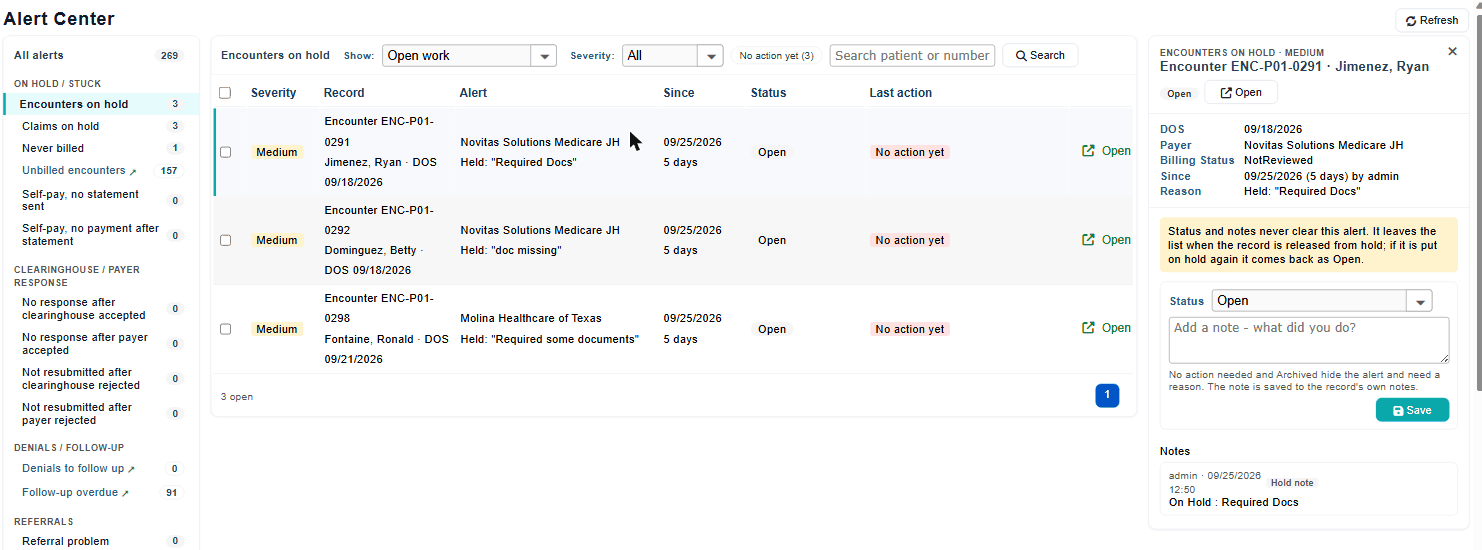
- Click the item. The panel shows its facts — DOS, payer, billing status, since, reason — and, for claims waiting on the payer, Where the claim is step by step.
- Fix the cause on the record itself — Open takes you there (release the hold, send the claim, apply the receipt …).
- Record what you did: choose a Status and type a note — what did you do? — then Save. The note is saved to the record's own notes (the claim's, encounter's, patient's or referral's).
| Status | Use it when |
|---|---|
| Open | not started |
| In progress | you are working on it |
| Waiting on others | waiting for the payer, the doctor, the patient |
| No action needed | nothing to do — hides it; a reason is required |
| Archived | done with it — hides it; a reason is required |
Status and notes never clear an alert
An item leaves the list only when its cause is fixed — the claim is released, sent, paid, the receipt applied. The panel says exactly what makes each one leave. No action needed and Archived only hide it from Open work; it is still counted as grey +n.
Example
Encounters on hold lists ENC-P01-0291, held 5 days for Required Docs. You call the office: set Status Waiting on others, note Called Dr. Adams' office 09/30 - docs by Friday, Save. On Friday the documents arrive; release the hold on the encounter and, after Refresh, the item is gone.
Many items at once
On full lists (not links), tick items — or tick the header box and Select all N — then use the bar: Set status, an optional Note (a reason is required for the hiding statuses), and Apply to n. Up to 500 at a time. Items that have left the list or already have that status are skipped.
On Self-pay, no statement sent, the Send statements button opens Patient Statement Manager with those claims.
Alerts on summaries
Claim, Encounter and Patient summaries show an Alerts card — the Alert Center lists this record is in — and a chip such as 2 alerts in the header. It is read-only; work the item in the Alert Center.
Common problems
| You see | Why | What to do |
|---|---|---|
| No alert types are switched on. | Every alert is switched off for the practice. | Switch them on in Alert Center settings. |
| A reason is required for "No action needed" | Hiding needs a reason. | Type why. |
| This alert has changed since the list was loaded | The record changed meanwhile. | Refresh and try again. |
| At most 500 items can be changed at once | Too many selected. | Narrow the filter. |
| An item I fixed is still listed | The list is from when you opened it. | Click Refresh. |