Claim and payment reports
What this is for
Six reports answer "how much did we bill?" and "how much did we collect?", grouped by payer, provider, facility or another choice.
| Report | One row per | Use it to |
|---|---|---|
| Claim Summary | group | see billed charges and claim counts per payer, provider, facility… |
| Claim Detail | claim | list the claims behind those numbers, with their balances |
| Monthly Billing Progress | group, three months side by side | see whether billing is going up or down |
| Payment Summary | group | see payments received per payer, provider, facility… |
| Payment Detail | posting | list each payment with allowed, adjustments and balances |
| Monthly Payment Progress | group, three months side by side | see whether collections are going up or down |
Before you start
- Reports → Reports Overview → Claim Reports or Payment Reports. How the screen works is on Running a report.
- Deleted claims are never counted. Claims in every status are — on hold, rejected, paid.
Group By
All six reports offer the same ten groupings: Payer, Rendering Provider (the default), Referring Provider, Billing Provider, Facility, Claim Type, Payer Type, Referral Source, Ordering Provider and Ordering Facility.
- On the claim reports, Payer and Payer Type mean the claim's primary payer.
- On the payment reports they mean the payer who made the payment, so a secondary payment is counted under the secondary payer.
Example
A claim billed $200 to Payer ABC (primary) and Payer XYZ (secondary). Payer ABC paid $120 and Payer XYZ paid $40. Claim Summary by Payer: $200 under Payer ABC. Payment Summary by Payer: $120 under Payer ABC and $40 under Payer XYZ.
Claim Summary
The number of claims and the billed amount for each group, with each group's share.
- Date range: Service Date, Entered Date and Created Date — fill any of them; a claim must be inside every range you fill.
- Filters: Rendering Provider, Billing Provider, Primary Payer, Payer Type, Facility, Place of Service, Billing Type, Claim Responsibility.
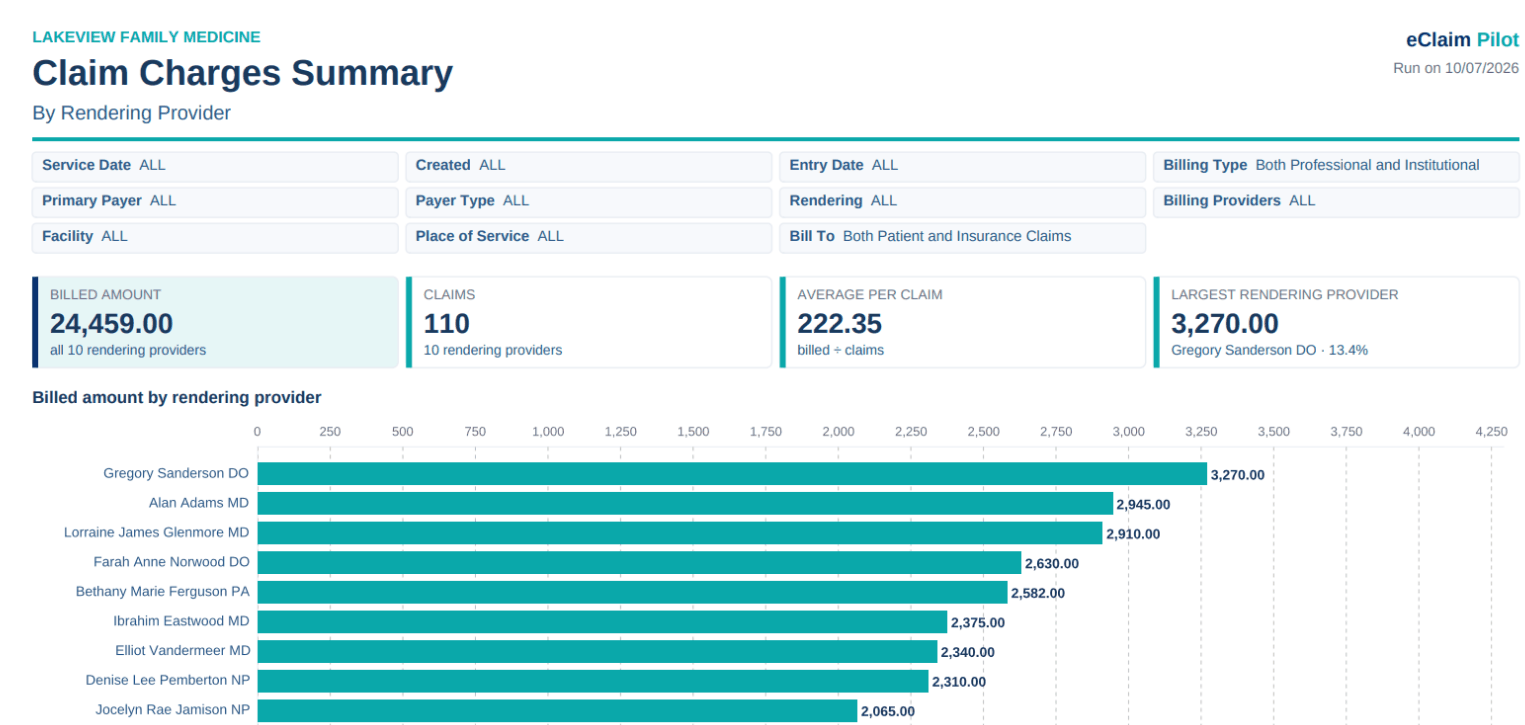
The PDF (titled Claim Charges Summary): boxes BILLED AMOUNT, CLAIMS, AVERAGE PER CLAIM and LARGEST (group) with its share; a bar chart of the ten largest groups; the table with a Share column and a Grand Total. The CSV has the code, name, number of claims and billed amount per group, and a total line.
Claim Detail
The same claims as Claim Summary, one row each, grouped and sorted by patient name: claim and encounter number, patient, date of service, entry date, facility, rendering provider, primary insurance, billed, insurance balance and patient balance. Dates, filters and Group By are as on Claim Summary.
The PDF: boxes CLAIMS, BILLED, INSURANCE BALANCE and PATIENT BALANCE; a band and a subtotal per group; a Grand Total.
The CSV contains patient details
The Claim Detail CSV includes the patient's date of birth, gender and SSN. Store and send it as you would any patient record.
Payment Summary
Payments received per group — insurance payments and patient payments. Adjustments and write-offs are not included (see Payments by Transaction Type for those). A reversed payment cancels out within the dates; a reversal made later shows as a negative amount in the period it was made.
- Date range: Service Date, Posting Date and Created Date.
- Filters: Rendering Provider, Billing Provider, Ordering Provider, Referral Source, Payer, Payer Type, Facility, Ordering Facility, Billing Type, and under Payment: Payment Type (insurance, patient or both) and Deposit Status (All, Pending, Deposited).
The PDF: boxes PAYMENTS, CLAIMS, AVERAGE PER CLAIM and LARGEST (group); a bar chart of the ten largest groups; the table with Share and Grand Total.
Claims by payer
When grouped by Payer, a claim paid by two payers is counted once under each, so the claim total can be higher than the number of claims paid.
Payment Detail
One row per payment posting, grouped: claim, patient, date of service, Billed On, Posted, billed, allowed, deductible, coinsurance, payment, adjustment, write-off, insurance balance and patient balance. Sorted by date of service, then claim number.
- Dates and filters as Payment Summary. Payment Type here is insurance when the posting was made against a payer, patient when not.
The PDF: boxes PAYMENTS, ALLOWED, ADJUSTMENTS and BALANCE; a band and a subtotal per group with all nine money columns; a Grand Total.
Billed and balances repeat per posting
Billed and the two balances are the claim's current figures, printed on every posting of that claim. When a claim has two postings, they are counted twice in the totals and in the BALANCE and "of … billed" figures. Use the Payments, Allowed and Adjustment totals, and Claim Detail for balances.
Payment Summary and Payment Detail read the payments in different ways (Summary from the transactions, Detail from the posting batches), so small differences between them can happen.
Monthly progress reports
Monthly Billing Progress (billed amount) and Monthly Payment Progress (payments) show three months side by side — the month you choose and the two before it — one row per group, ranked by the latest month.
- Month and Year — the latest of the three months.
- Date Option (Billing only): DOS (date of service, default) or EntryDate (the date the claim was entered). Payments always use the posting date.
- Change compares the latest month with the month before it: green when up, red when down. A group with nothing the month before shows +100.00%.
The PDF: three month boxes and the top group in the latest month; a grouped bar chart of the ten highest; the table oldest month to latest with the Change, and a Total. In the CSV the months are headed Month 1, Month 2, Month 3 (oldest first), and the name column is headed Provider Name whatever the grouping.
Example
Month = September, Year = 2026, Group By = Payer: one row per payer with July, August and September. Payer ABC: $8,000, $9,500, $7,600 — Change −20.00%, in red.
Filters that do nothing on payment reports
Ignore these two filters for now
- Claim Responsibility shows on all three payment reports but is not applied. To see only patient or only insurance money, use Payment Type instead.
- Billing Type is not applied on Payment Detail. Use Payment Summary for a professional-only or institutional-only total.
Both still print on the PDF as if they had been applied.
Good to know
- On the Payment Summary and Payment Detail PDFs, the Payer box in the filter grid always reads ALL, even when you chose a payer. The rows are filtered correctly — the chips on screen show what was applied.
- The Report title: on screen shows the grouping without spaces (e.g. Claim Summary by RenderingProvider); the PDF title is correct.
Common problems
| You see | Why | What to do |
|---|---|---|
| "To DOS is required." / "From DOS is required." | only one end of Service Date is filled ("DOS" is Service Date) | fill both ends, or clear both |
| The patient-only and insurance-only runs give the same payment total | Claim Responsibility is not applied on payment reports | use Payment Type |
| Payment Detail's balance total is far higher than the A/R | balances repeat on every posting of a claim | use Claim Detail or an aging report for balances |
| Payment Summary and Payment Detail differ slightly | they read payments from different places | for a total, use Payment Summary |
| A claim on hold is in the totals | the claim reports count every status | filter it out in the CSV if needed |
Related
- Running a report
- Financial reports — charges, payments and adjustments together
- Aging reports — open balances
- Insurance payments