Patient Authorizations
What this is for
Many payers pay for some services — therapy visits, imaging, behavioural health, home care — only when they approved them beforehand. The approval is a prior authorization: a number, a date range and, usually, a limit per service (12 visits of 97110, 8 units a week of 97140, …). A claim without a valid authorization, or over its limit, is denied.
Patient Authorizations keeps each authorization with its services and letters, counts what the encounters have used, warns when one is running out, checks every encounter and claim against it, and sends its number on the claim (837 REF*G1, CMS-1500 box 23).
A prior authorization is not a referral (the primary care doctor's permission to see a specialist) — see Patient Referrals. A visit can need both.
Where authorizations are kept
| Where | What you see |
|---|---|
| Patient → Patient Authorization | every authorized service of the practice — the worklist |
| Patient Setup → Authorizations tab | one patient's authorizations — Add New Authorization here |
| Patient Summary | an Authorizations card |
| Encounter and Claim screens | the Authorization field, and a banner when something is wrong |
| Alert Center | Authorizations expiring and Authorization problem |
Before you start
- The patient needs an insurance profile: an authorization belongs to one profile and one of its insurances.
- To mark a plan as needing an authorization, see Which plans need an authorization.
- Opening and editing authorizations needs the Patient Authorization menu rights.
Steps: add an authorization
- Open the patient (Patient Setup → Authorizations) and click Add New Authorization — or use Add New Authorization on the list and pick the patient.
-
On Details, fill in what the payer approved:
Field What to enter Example Insurance Profile, Insurance the plan it is for — it starts on the patient's Default profile; only that profile's insurances are offered; the payer comes from the insurance Default · Payer ABC - Primary Status Approved, Pending (asked for, no answer yet), Denied or Cancelled Approved Authorization # the number the payer gave — required, and unique for the patient and profile AUTH-20811 Start Date, End Date the dates on the approval 10/01 – 12/31 Payer Case ID, Approved By, Approval Date from the approval letter, if given CASE-01 Rendering Provider the provider the approval names — empty means any provider 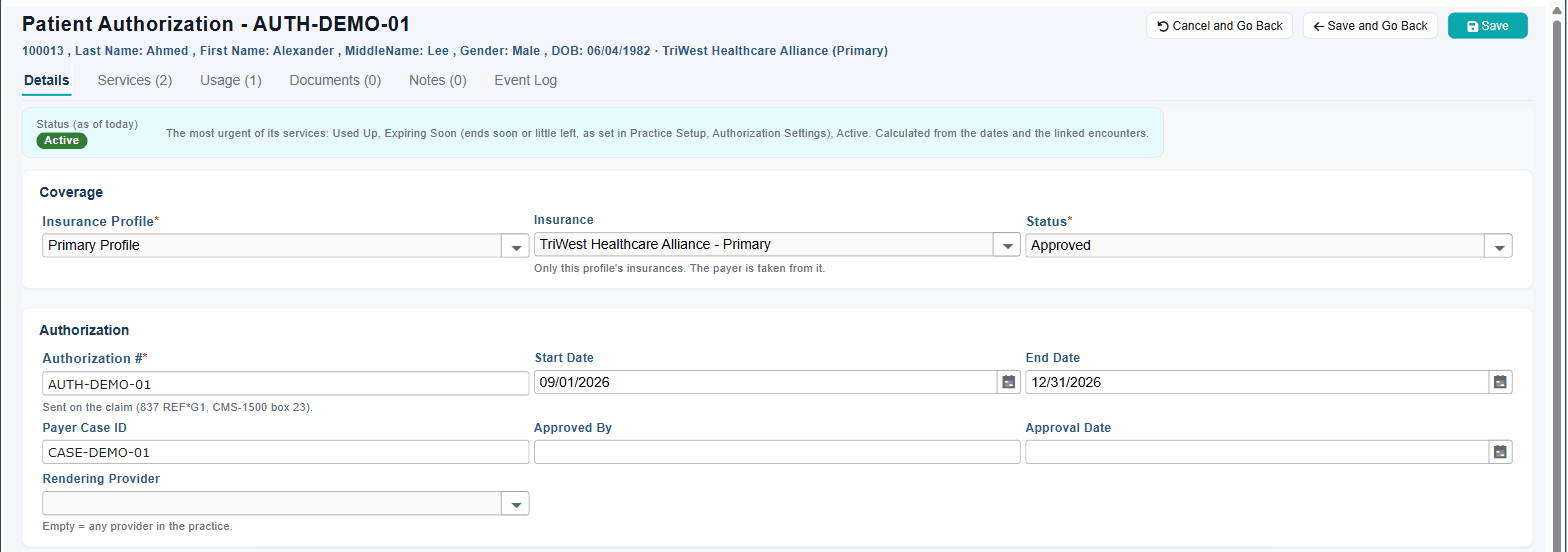
Details — the status today, the plan it is for, and the number and dates the payer gave. -
Click Save. Services, Documents, Notes and Event Log open after the first save.
-
On Services, click Add Service once per approved procedure:
Field What to enter Example Procedure Code, Modifiers the code approved; modifiers only if the approval names them 97140 · GP Allowed, Type the limit and what it counts: Visits, Units, Hours or Dollars 8 · Units Per the whole authorization, or per Day, Week or Month Week From Date, To Date only when the service has its own dates; empty = the authorization's Provider only when the approval names one for this service 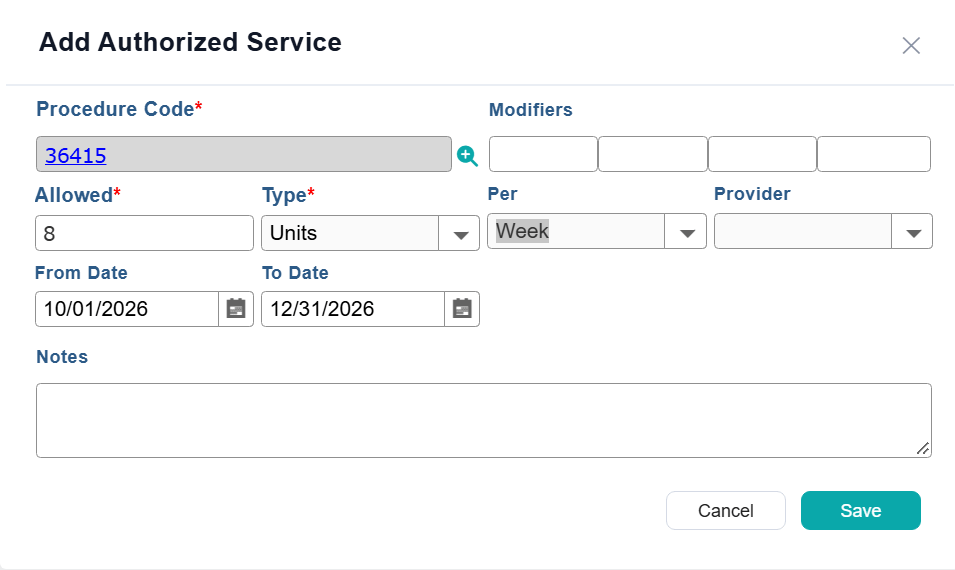
Add Authorized Service — one approved procedure: 8 units of 36415 a week. -
On Documents, add the request, the approval or denial letter, or a portal printout.
Example
Payer ABC approves 12 visits of 97110 and 8 units a week of 97140 GP for 10/01 – 12/31, under AUTH-20811. Add the authorization with those dates and Status Approved, then two services: 97110 · 12 · Visits · whole authorization, and 97140 · GP · 8 · Units · Week. Attach the approval letter on Documents.
How much is used
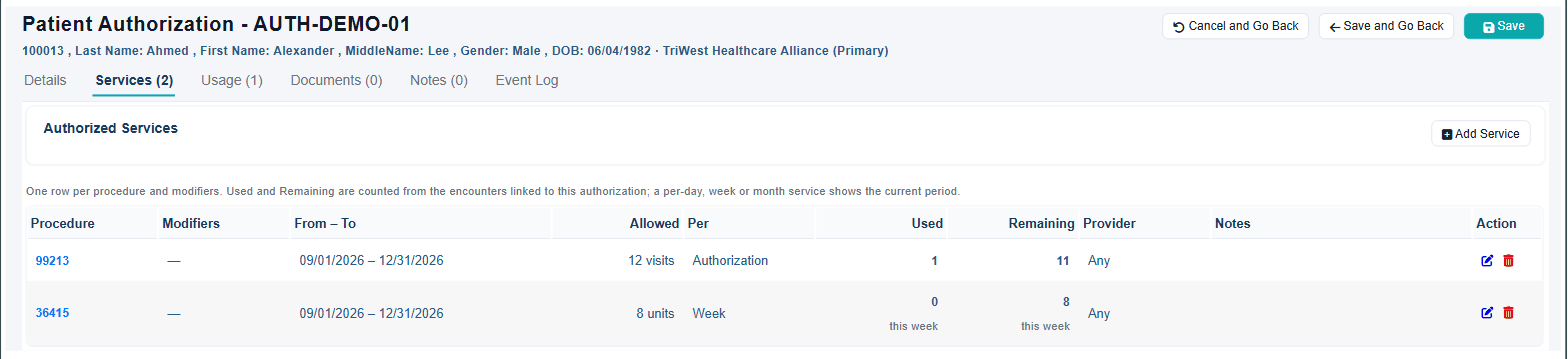
Used and Remaining on Services are counted from the encounters linked to the authorization, every time you look — nothing has to be updated by hand:
| Type | One encounter line counts as |
|---|---|
| Visits | one visit per date of service — two lines (or two encounters) on the same day are one visit |
| Units | the line's units |
| Hours | the line's units ÷ 4 (15-minute units) |
| Dollars | not counted — encounter lines carry no charge; the limit is shown for reference |
A line counts against the service with the same procedure whose modifiers are all on the line, and whose dates hold the line's date of service; when two fit, the one with more modifiers wins. A per Day / Week / Month service shows the current day, week (Monday – Sunday) or month.
The Usage tab lists every procedure line of the linked encounters in date order, with what it counted as — or why it did not count (procedure not authorized, date of service outside, dollars not counted). Unlinking or deleting an encounter gives its use back at once.
Claims made directly, with no encounter, are not counted.

Status
Worked out every day, for each service and for the authorization (the most urgent of its services). The Status (as of today) strip on the authorization's Details follows a service save or delete at once - no need to reopen the authorization.
| Status | When |
|---|---|
| Pending, Denied, Cancelled | the Status you set |
| Expired | today is after the end date |
| Used Up | a whole-authorization service has nothing left |
| Not Yet Valid | today is before the start date |
| Expiring Soon | ends within the practice's warning days, or a whole-authorization service has the warning share or less left (Practice Setup → Authorization Settings: 14 days / 20% by default) |
| Active | none of the above |
A per Day / Week / Month limit never makes an authorization Used Up or Expiring Soon — it starts again each period.
The authorization list
Patient → Patient Authorization shows one card (or row) per authorized service, across all patients: patient, Authorization #, Status, Payer, Service, Provider, Valid, Days Left, Used (of the allowed) and Remaining. It opens showing Active, Expiring Soon and Used Up, ordered by Days left (fewest).
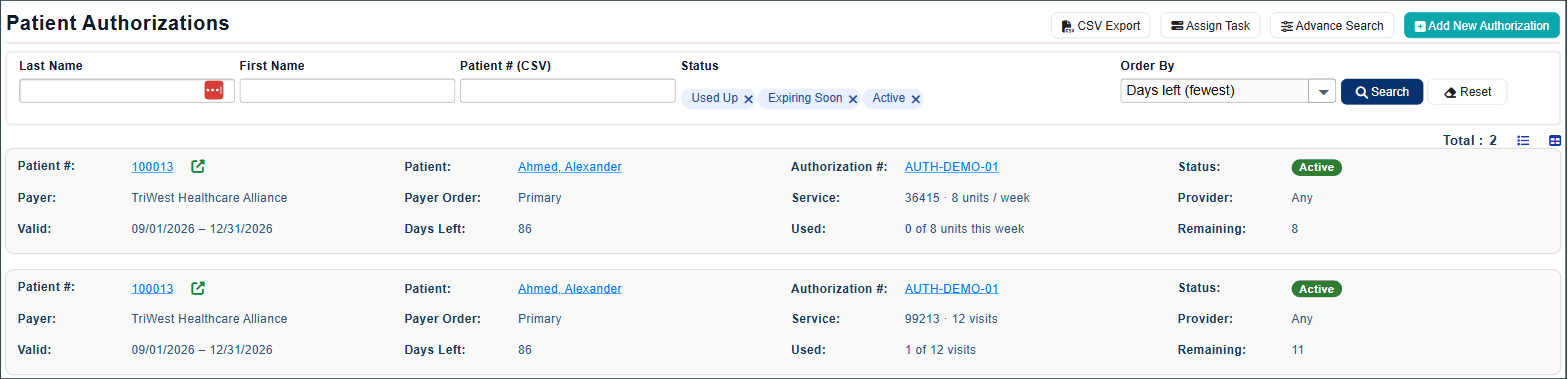
- Search by name, Patient # or Status; Advance Search adds Ends within (days), End Date from – to, Authorization # (CSV), Procedure Code, Type, Remaining at most, Payer and Provider.
- CSV Export exports every row the search finds.
- Assign Task makes one task per authorization in the search result (two services of one authorization are one task). A task icon beside the Authorization # opens its open task.
Which plans need an authorization
- On the payer: Claim Rules → Authorization Required = Yes (Payers).
- On a patient's insurance: Authorization Required — Follow payer, Yes or No — overrides the payer for that patient's plan.
The check below uses the insurance the claim is billed to.
Authorizations on encounters and claims
The Authorization field lists the Approved and Pending authorizations of the chosen insurance profile — e.g. AUTH-20811 · Active · 10/01 – 12/31, with its services on the line below. Denied and Cancelled ones are not offered, except the one this encounter or claim is already linked to, which stays in the list whatever its status. Choosing one fills Authorization # (read-only while linked) and Authorized Services. Choose - None - to type an Authorization # by hand instead.

- On a new encounter, when exactly one authorization fits — Approved, the date of service inside its dates, and covering one of the visit's procedures once they are entered — it is linked automatically: ✓ Linked automatically - the only authorization that fits this visit. With several, the fitting ones come first with Fits this visit, and you pick one. - None - stops the automatic link.
- A new encounter saved with an Authorization # that matches one of the patient's authorizations on that profile — typed, imported or from Create Group Encounter — is linked to it.
- A claim made from an encounter keeps its authorization.
- Correcting the number on the authorization copies it onto its encounters and onto its claims not sent yet. A claim already sent keeps the number it was sent with — to resubmit it with the corrected number, open it and choose the authorization again.
The authorization banner
Every procedure line is checked against the authorization, as of its date of service:

| Finding | Banner text | Blocks? |
|---|---|---|
| Missing | {Payer} requires an authorization - none is linked or entered. | yes |
| Cancelled / Denied | AUTH-… is Cancelled. | yes |
| Out of range | 97110 on 01/05 is outside AUTH-… (start - end). | yes |
| Exceeded | 97530 on 10/14 goes over AUTH-…: 5 of 4 hours. | yes |
| Wrong insurance | AUTH-… is for {payer}, which is not on this insurance profile. | yes |
| Pending | AUTH-… is still Pending with the payer. | warning only |
| Not on the authorization | 99213 is not on AUTH-…. | warning only |
| Not the authorized provider | AUTH-… names {provider}; the rendering provider is {provider}. | warning only |
A blocking finding shows the red banner Authorization problem - this claim may be denied and a chip beside Authorization and on the procedure line; warnings show the amber Authorization - please check. The same banner is on the Encounter and Claim Summary. Exceeded counts earlier dates of service first, so the visit that goes over is the one flagged. The banner follows the screen before you save: picking an authorization, adding a procedure line (typed, from the most common codes or from a claim macro) and a new claim made with Create Claim from an encounter all show it at once.
Encounters can always be saved. A claim with a blocking finding cannot be created, or sent (EDI or paper), unless the user has Can Create Claim On Authorization Issue / Can Transmit Claim On Authorization Issue (set by an administrator in the admin app). It is listed in the Alert Center under Authorization problem.
Example
AUTH-20811 allows 4 hours of 97530 and 4 hours are used. An encounter on 10/14 bills 4 more units of 97530 (1 hour): the line shows Exceeded — 97530 on 10/14 goes over AUTH-20811: 5 of 4 hours — and, without the right, its claim cannot be created. Ask the payer for more hours, raise Allowed on the service (or add the new authorization), and the banner clears.
Renewals
An authorization that is Expiring Soon, Used Up, or Expired in the last 30 days — and is still needed (an encounter is linked to it, or the patient has an unbilled encounter on that plan) — gets an Authorization Renewal task every night, for the user group set in Authorization Settings (Check now runs it at once). The task's description says which raised it: Raised by the nightly authorization check or Raised by Check now. It is also listed in the Alert Center under Authorizations expiring.
The task closes by itself, with a note, when a later authorization for the same procedure is saved on that insurance profile, when the authorization is deleted, or when the next night's check finds it no longer needs renewing (cancelled, denied, limit raised, dates moved).
Denials
On Denial Follow-up, every denied claim shows an Authorization # line under the referral line: a tracked authorization links to it, with its status today, its dates and each service's use; a number typed on the claim shows as typed; otherwise None on the claim.
Common problems
| You see | Why | What to do |
|---|---|---|
| Add an insurance profile to this Patient before adding an authorization. | No insurance profile. | Add the patient's insurance first. |
| Authorization number already exists for this patient and insurance. | Entered twice. | Open the existing one. |
| Authorization Start Date cannot be after the End Date. | Dates swapped. | Correct them. |
| A line already exists for this Procedure + Modifiers under this Authorization. | The service is already on it. | Edit that service instead. |
| This authorization is linked to an encounter or claim and cannot be deleted. Set its status to Cancelled instead. | It is in use. | Set Status to Cancelled. |
| The selected authorization does not belong to this patient and insurance profile. | The profile changed on the encounter or claim. | Pick an authorization of that profile. |
| Authorization # … is longer than 50 characters and cannot be sent on a claim. | The number is too long for the claim. | Shorten it on the authorization first. |
| Authorization # cannot be longer than 50 characters while encounters or claims are linked to it - it is sent on the claim. | A longer number would not fit on the claims. | Keep it to 50 characters. |
| Authorization problem (…); you do not have permission to create claims with an authorization problem. | A blocking finding. | Fix the authorization, or ask for the permission. |
| Used stays 0 | The encounters are not linked to the authorization, or the procedure / modifiers / dates do not match a service. | Link the encounters; check the Usage tab for why a line did not count. |
| An authorization is not in the list | The list opens on Active, Expiring Soon and Used Up. | Change Status. |