Practice Setup
What this is for
Practice Setup holds everything your practice sets once and then relies on: its name and address, the default providers and facility, how records are numbered, what prints on statements, which checks claims must pass, the words the screens use, and which alerts are shown.
Before you start
- Open it from the menu: Master Setup → Practice Setup.
- It always opens the practice you are working in — the one shown in the top bar. To set up another practice, switch to it first.
- Each tab has its own Save button and saves only that tab. You can move between tabs without losing what you typed, but nothing is kept until you save.
- Event Log (top right) lists every change made on any tab — who, when, and old → new value.
- A demo practice cannot be changed here — Practice setup cannot be changed for demo practices.
The tabs
| Tab | What it holds |
|---|---|
| General Information | the practice's name, address, NPI and Tax ID |
| Settings | default providers and facility, claim reversal, referral settings, and numbering |
| Statement Settings | what prints on patient statements, and the statement SFTP upload |
| Claim scrubbing | the checks a claim must pass before it is sent |
| Application UI Preferences | the top-bar title and your own words for Patient, Encounter and Facility |
| Alert Center | which alerts are shown, and after how many days |
General Information
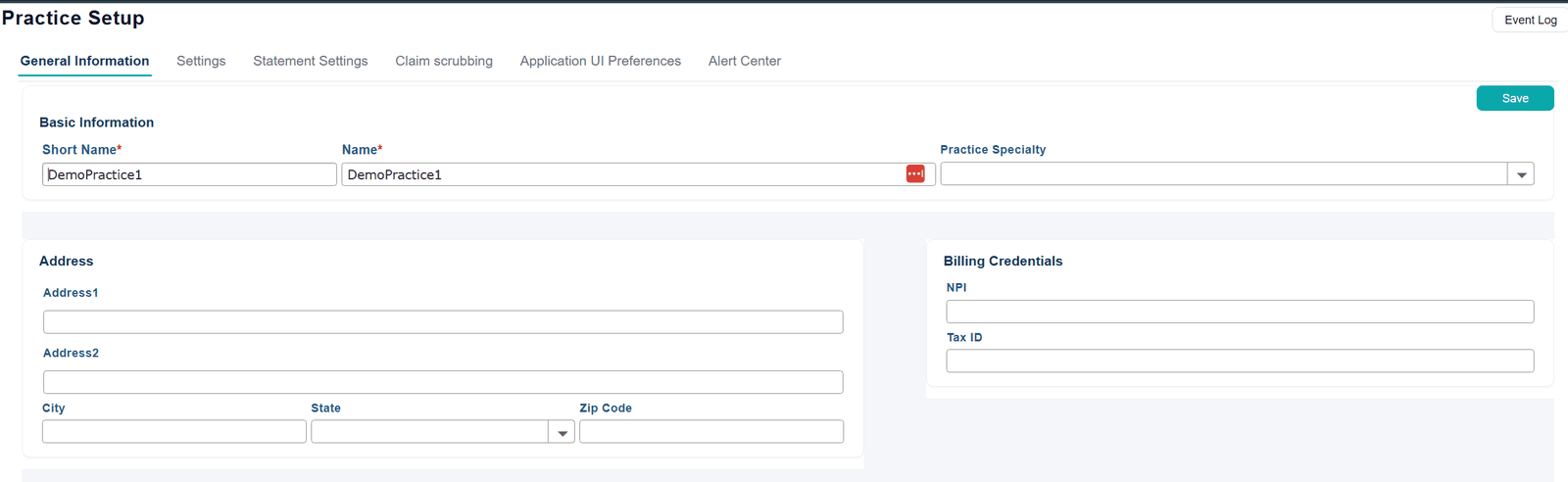
| Field | Notes |
|---|---|
| Short Name | Required, up to 50 characters, unique. Shown in the practice switcher unless a Top Practice Switch Name is set. |
| Name | Required, up to 200 characters, unique. Sent as the submitter name on electronic claims, and printed on patient receipts. |
| Practice Specialty | Optional — e.g. Primary Care, Mental Health, PT/OT/Speech Therapy. |
| Address1, Address2 | 3–55 characters each. |
| City | 3–30 characters. |
| State, Zip Code | ZIP of 5 or 9 digits. |
| NPI | The practice's NPI, up to 10 digits. |
| Tax ID | 9 digits, shown as 99-9999999. |
Claims use the Billing Provider
The name, address, NPI and Tax ID printed in box 33 of the CMS-1500 and sent as the billing provider come from the claim's Billing Provider, not from this tab.
Steps: change the practice details
- Open Master Setup → Practice Setup. General Information is the first tab.
- Change the fields.
- Click Save. Data Saved Successfully appears.
Common problems
| You see | Why | What to do |
|---|---|---|
| Short Name cannot be empty / Name cannot be empty | A required field is blank. | Fill it in. |
| Address1 must be between 3 and 55 characters | The address is too short or too long. | Correct it. |
| Invalid Zip Code. Zip Code can either be of 5 Characters or of 9 | The ZIP is the wrong length. | Enter 5 or 9 digits. |
| Tax ID must be 9 characters | The Tax ID is incomplete. | Enter all 9 digits. |
| … a record with the same short name already exists. | Another practice uses that short name. | Choose another. |