Rendering Provider
Under Master Setup → General Setup → Rendering Provider. For which provider is which, see Providers.
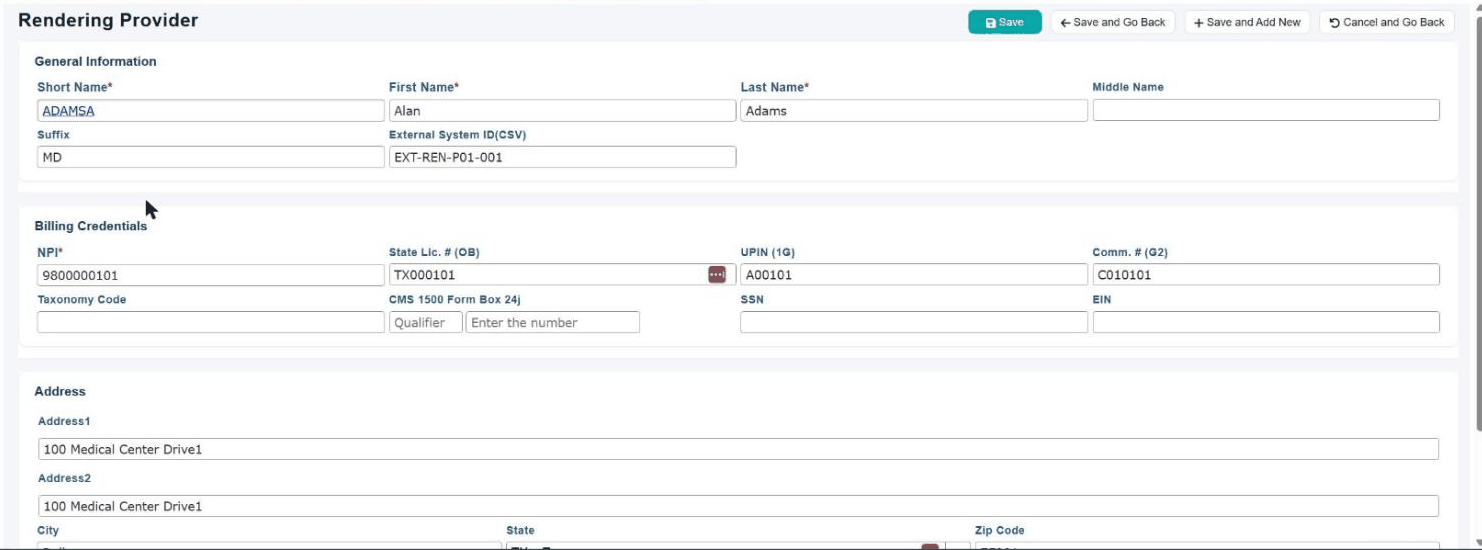
| Field | What to enter |
|---|---|
| Short Name | your code — or empty for automatic numbering |
| First Name, Last Name (required), Middle Name, Suffix | as on the NPI registry |
| External System ID(CSV) | ids in other systems, comma-separated, for imports |
| NPI (required) | the clinician's individual NPI — box 24J |
| Taxonomy Code | sent with the rendering provider on electronic claims |
| CMS 1500 Form Box 24j | a qualifier and a number, printed in the shaded 24I and 24J of the paper form when both are filled — see box 24J |
| State Lic. # (OB), UPIN (1G), Comm. # (G2), SSN, EIN | kept for reference |
| Address | the provider's address |
The rendering provider in Practice Setup → Default Values fills in on every new claim and encounter.
Common problems
| You see | Why | What to do |
|---|---|---|
| Invalid NPI. NPI must be 10 digits. / NPI must be numeric and 10 characters. | The NPI is not 10 digits. | Check it on the NPI registry. |
| A Provider with NPI 'X' already exists. | That NPI is already on file. | Use the existing record. |
| Short Name cannot be empty (company is configured for manual short name entry). | Your practice types short names. | Type one. |
| This record cannot be deleted because it is used in Claims | Claims use this provider. | Deactivate it instead. |