Daily Activity
What this is for
Daily Activity answers the billing manager's first question of the day: did the work happen? One table shows what came in, what went out, what came back and what money was posted — yesterday (or today) beside the day before — with red rows where something went wrong. Click any row to see the records behind it.
For longer periods, use the dashboards.
Before you start
- Open it from the menu: Administration → Daily Activity. It opens on Yesterday.
- It shows the practice you are working in.
- Everything is counted by the day each record was entered — not the date of service, and not the posting date typed on a payment batch.
Reading the table
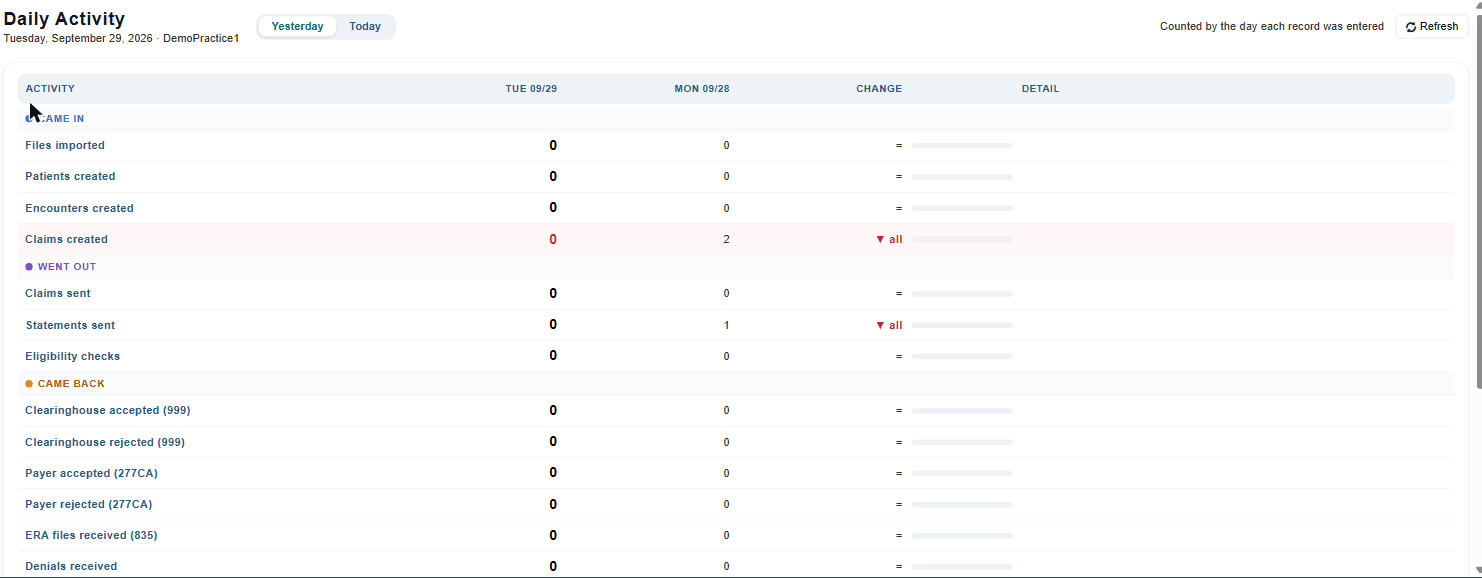
| Column | What it shows |
|---|---|
| Activity | what is counted — hover for exactly how |
| the day (e.g. Tue 09/29) | the count or amount for the chosen day |
| the day before | the same for the previous day |
| Change | = no change, ▲ n / ▼ n, or ▼ all when it dropped to zero. Green is good news, red is bad — for rejections and holds, up is bad |
| bar | the day compared with the larger of the two days |
| Detail | a breakdown — e.g. N with errors, N EDI · N paper, $ charges |
Red rows mark a problem: a rejection, or work that stopped after a normal day (claims created, claims sent or insurance payments at zero when the day before had some).
The rows
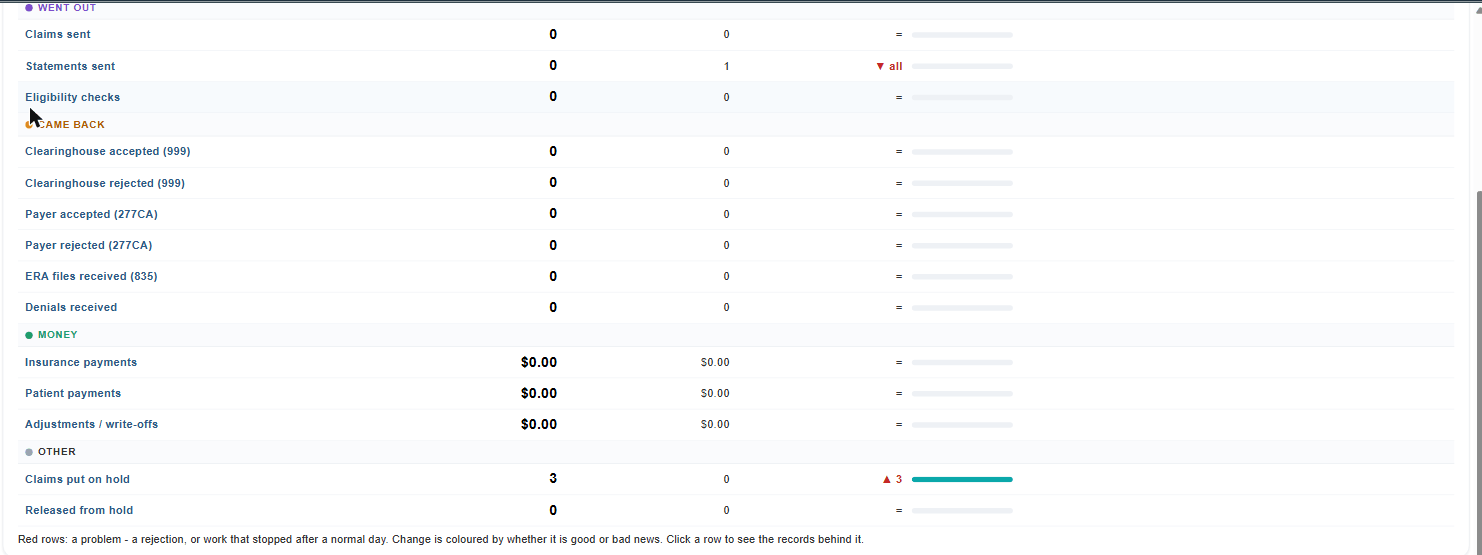
| Group | Row | Counts |
|---|---|---|
| Came in | Files imported | import jobs uploaded that day — detail: rows, and jobs with errors |
| Patients created | patients entered that day — by hand or imported | |
| Encounters created | encounters entered that day — by hand or imported | |
| Claims created | claims entered that day, with their charges | |
| Went out | Claims sent | claims put in transmission batches that day — EDI or paper |
| Statements sent | statements marked as mailed that day, one per patient | |
| Eligibility checks | eligibility checks created that day — answered, waiting (queued or being sent), no response and error; the four add up to the count | |
| Came back | Clearinghouse accepted / rejected (999) | claims a 999 loaded that day accepted / rejected |
| Payer accepted / rejected (277CA) | claims a 277CA loaded that day accepted / rejected | |
| ERA files received (835) | 835 files received that day, and the claims in them | |
| Denials received | claims with a line denied (denial code, nothing paid) posted that day | |
| Money | Insurance payments | insurance payments posted that day |
| Patient payments | patient payments posted that day | |
| Adjustments / write-offs | insurance adjustments, and insurance and patient write-offs, entered that day, each shown in dollars under the row; a reversal counts negative | |
| Other | Claims put on hold / Released from hold | claims held or released that day |
See the records behind a row
Click a row. A list opens below the table — Time, Record, Detail, Amount — for the chosen day, newest first; click Close to hide it. It lists exactly the records counted: the imported files with their status, the claims sent with EDI or paper and payer, the rejected claims with the error, the payments per claim with their transaction codes. For a Money row the list's title gives the dollars and the number of claims, for example Insurance payments - Yesterday ($1,234.00 on 12 claims).
Example
Monday morning: Claims sent is red — 0 yesterday, 42 the day before, ▼ all. Click the row to confirm nothing went out, then check the EDI Transmission Queue — the claims are there, waiting. Clearinghouse rejected (999) shows 3; click it to see the three claims and their errors, and fix them from Acknowledgements.
Good to know
- Today compares a day still in progress with the whole of yesterday — early in the morning most rows show ▼, and rows can turn red as stopped. Use Yesterday for the real check.
- Money is counted by the day the payment was entered, so it can differ from the Payment Summary dashboard, which uses the posting date on the batch.
- Statements sent counts only batches marked as mailed (Patient Statements).
- Claims put on hold counts claims only, not encounters.
- The numbers are worked out when you open the screen; click Refresh for the latest.
Common problems
| You see | Why | What to do |
|---|---|---|
| Nothing could be counted - see the server log. | The numbers could not be worked out. | Refresh; tell your administrator if it repeats. |
| A row seems to be missing | A single row that fails is left out. | Refresh; tell your administrator. |
| Nothing on this day. in the list | Nothing to show for that row on that day. | — |
| No Daily Activity in the menu | Your role was not given it. | Ask your administrator. |