Application UI Preferences
What this is for
This tab changes how eClaim Pilot reads for your practice: the title in the top bar, and the words used on screens. A therapy practice can call patients Clients and encounters Sessions; the screens then say Client and Session everywhere.
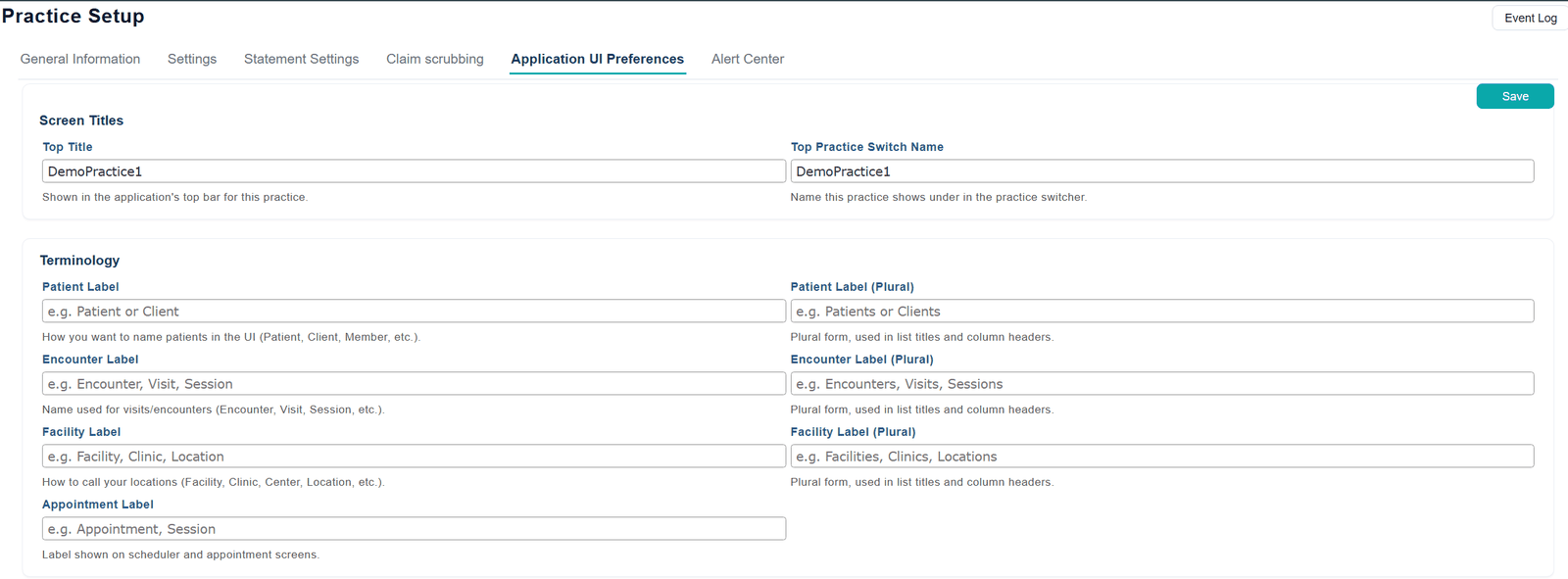
Screen Titles
| Field | What it does | Left blank |
|---|---|---|
| Top Title | Shown in the top bar for this practice. | the practice Name, City |
| Top Practice Switch Name | The name this practice shows in the practice switcher. | the Short Name |
Terminology
| Field | Example | Left blank |
|---|---|---|
| Patient Label / (Plural) | Client / Clients | Patient / Patients |
| Encounter Label / (Plural) | Session / Sessions | Encounter / Encounters |
| Facility Label / (Plural) | Clinic / Clinics | Facility / Facilities |
| Appointment Label | Session | Appointment — not used on any screen yet |
- Fill in the plural too. It is never made by adding an s — Child needs Children.
- The words change on screen labels, column headings, tooltips and messages.
- They never change on claim forms and electronic claims (CMS-1500, UB-04, 835, 277), on Patient Responsibility, on statement titles, or in exported files — those use the standard terms your payers expect.
- This help site always uses the standard words — Patient, Encounter, Facility.
Example
Set Patient Label to Client, Patient Label (Plural) to Clients, and save. Screen labels and column headings now say Client and Clients — but box 2 of the CMS-1500 is still Patient's Name.
Steps
- Open Master Setup → Practice Setup, then Application UI Preferences.
- Fill in the titles and words you want.
- Click Save.
The new words show straight away for you. For the new Top Title, and for everyone else, they show after switching practice or logging in again.