Alert Center settings
What this is for
The Alert Center (on the main menu) lists the work that is stuck — claims on hold, claims never sent, rejections nobody has fixed, receipts not applied, and more. This tab, the last one in Practice Setup, decides for your practice which of those alerts are shown and how many days an item waits before it is listed.
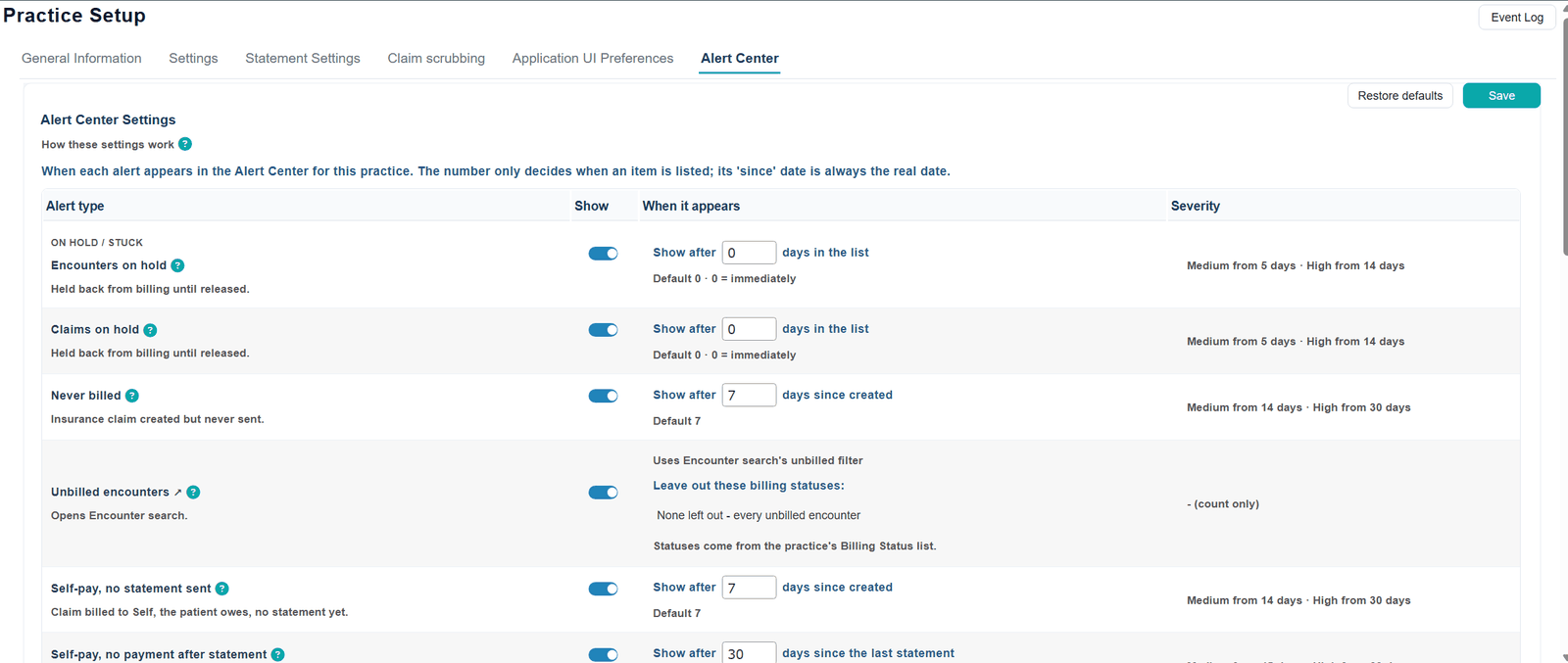
Before you start
- Open it from the menu: Master Setup → Practice Setup, then the Alert Center tab.
- The settings belong to the practice you are working in. Each practice has its own.
- A new practice starts with every alert on and the default day numbers shown below.
Reading a row
Every row has four columns.
| Column | What it means |
|---|---|
| Alert type | The name of the alert and a one-line description. A ↗ after the name means the row is a link (see below). Click ? for the full rule. |
| Show | The switch. Off removes this alert from the Alert Center for your practice. Nothing is deleted — switch it back on and the current items are listed again. |
| When it appears | Show after [N] days … — an item is listed only once it is this many days old. 0 means at once. Under the box: the default, and changed when yours differs. |
| Severity | How urgent the item is shown, from its age. Fixed for each alert — it cannot be changed here. |
The day number only decides when an item is listed. It never changes the item's Since date (that is always the real date), and it never changes the severity. The counts on the Alert Center's left-hand list use the same rule.
Severity works the same way for every alert that has day numbers:
- younger than the Medium from days — Low
- from Medium from days — Medium
- from High from days — High
How the day number and severity work together
Never billed — Show after 7, severity Medium from 14 days · High from 30 days. A claim created on 09/01 and not sent:
| Date | Age | In the Alert Center? |
|---|---|---|
| 09/01 – 09/07 | 0–6 days | not listed yet |
| 09/08 | 7 days | listed, Low, Since 09/01 |
| 09/15 | 14 days | Medium |
| 10/01 | 30 days | High |
Change Show after to 20 and the claim first appears on 09/21 — already Medium, and still showing Since 09/01.
Link rows (↗)
A row with ↗ is a link: the Alert Center shows only a count, and clicking it opens the screen that is already the work list for it — Denial Follow-up, Job Monitor and so on — filtered. The work, the follow-up status and the notes stay on that screen.
A link row has no day number and its severity reads - (count only). When it appears tells you whose rule it uses — for example Uses the Job Monitor screen's own rule (status Failed). The only thing you can change on a link row is Show (and, for Unbilled encounters, the billing statuses to leave out).
The settings, one by one
The day numbers below are the defaults. The examples use the default unless they say otherwise.
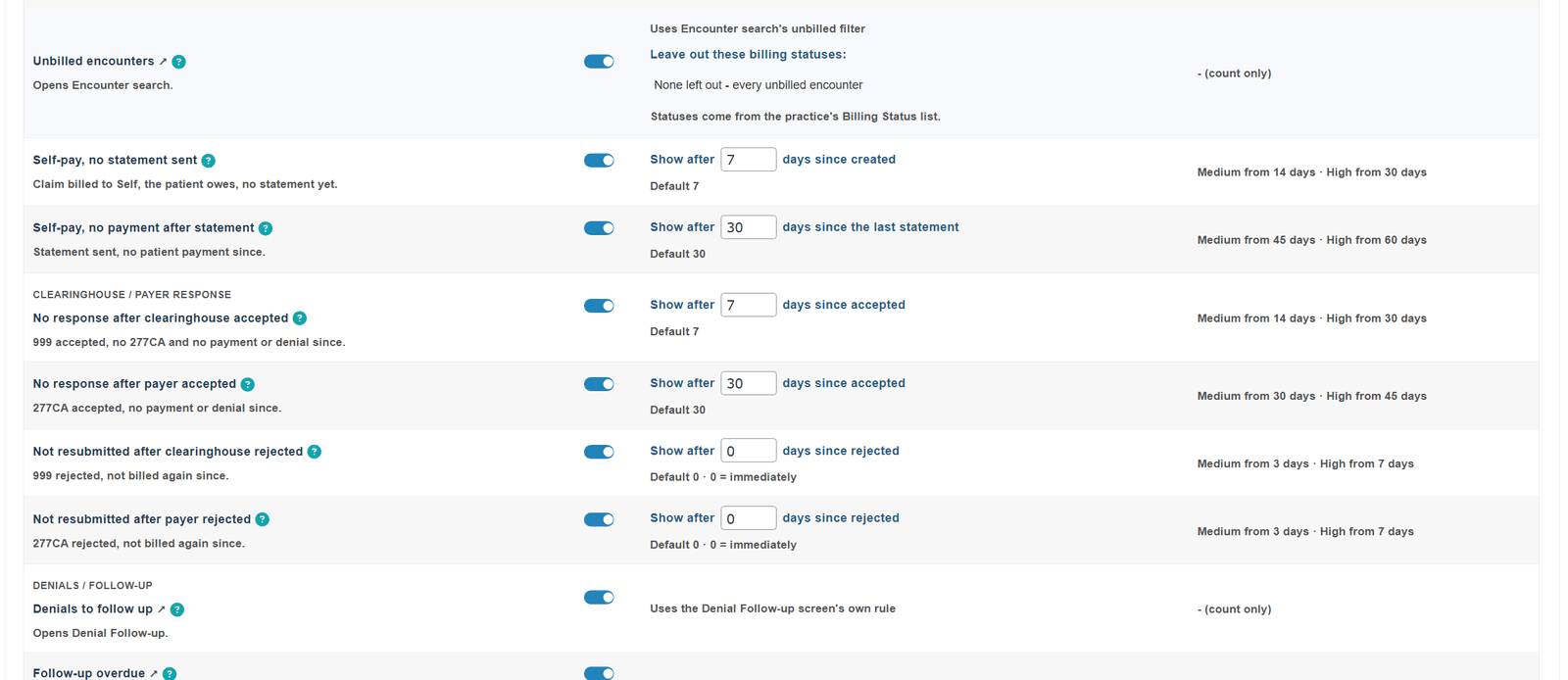
On hold / stuck
Encounters on hold
Held back from billing until released. · Show after 0 days in the list · Medium from 5 days · High from 14 days
- Listed when: an active encounter is on hold. Since is the date of the note that put it on hold, and the reason shown is that note. A hold with no hold note is listed at once, whatever the day number.
- Leaves when: the encounter is released from hold. Put on hold again, it comes back as Open with a new Since.
Example
An encounter is put on hold on 09/15 with the note On Hold : waiting for auth. With the default 0 it is listed straight away as Low, reason Held: "waiting for auth". It turns Medium on 09/20 and High on 09/29. Set Show after to 7 if a short hold is normal for you: the encounter then first appears on 09/22, already Medium.
Claims on hold
Held back from billing until released. · Show after 0 days in the list · Medium from 5 days · High from 14 days
- Listed when: an active claim of an active patient is on hold. Since is the date of the hold note. The amount shown is the billed amount.
- Leaves when: the claim is released. Held again, it returns as Open.
- A note added from the Alert Center goes to the claim's notes and counts as a follow-up.
Example
With Show after 3, a claim put on hold on 09/25 appears on 09/28 (Low), turns Medium on 09/30 and High on 10/09. Released on 10/02, it leaves the list.
Never billed
Insurance claim created but never sent. · Show after 7 days since created · Medium from 14 days · High from 30 days
- Listed when: an active insurance claim (not billed to the patient) has never been sent — no EDI, no paper. Since is the day the claim was created; the reason reads Created MM/dd/yyyy - never sent.
- Leaves when: the claim is sent, by EDI or on paper.
Example
A claim created on 09/20 and not sent is listed on 09/27 (Low), Medium on 10/04 and High on 10/20. If your practice always holds new claims for a coding review of about two weeks, set Show after to 14 so only the ones that have really been forgotten are listed.
Unbilled encounters ↗
Opens Encounter search. · link, count only
- Counts: active encounters that have no claim yet, in every billing status except the ones you leave out here. Encounters with no billing status are counted too. The count is Encounter search's own, so it matches the rows the click shows.
- Leave out these billing statuses: choose billing statuses from your practice's Billing Status list. Encounters in those statuses are not counted. Nothing chosen (None left out - every unbilled encounter) counts them all.
- Leaves the count when: a claim is created for the encounter, or its billing status becomes one you left out.
- Click: opens Encounter search as Unbilled Encounters.
Example
You have 12 unbilled encounters; 4 of them are in Coding Pending, which the coders work from their own queue. Choose Coding Pending under Leave out, click Save — the Alert Center now shows 8.
Self-pay, no statement sent
Claim billed to Self, the patient owes, no statement yet. · Show after 7 days since created · Medium from 14 days · High from 30 days
- Listed when: an active claim billed to Self still has a patient balance and no statement has been sent for it. Since is the day the claim was created; the amount shown is the patient balance.
- Leaves when: a statement is sent for the claim, or the patient balance is cleared.
- On this list the Alert Center has a Send statements button: it opens the Patient Statement Manager already filtered to these claims.
Example
A self-pay claim created on 09/10 with $80.00 owed is listed on 09/17 (Low), Medium on 09/24, High on 10/10. Statements go out every Friday? Set Show after to 10 so a claim waiting for the next run is not listed.
Self-pay, no payment after statement
Statement sent, no patient payment since. · Show after 30 days since the last statement · Medium from 45 days · High from 60 days
- Listed when: the patient still owes on a claim, a statement has been sent, and no patient payment has been posted since the last statement. Since is the date of the last statement.
- Leaves when: a patient payment is posted after the statement, or the patient balance is cleared. A new statement starts it again as Open, counting from the new statement.
Example
A statement goes out on 08/15 and nothing is paid. The claim is listed on 09/14 (Low), Medium on 09/29 and High on 10/14. A new statement on 10/01 starts it over: it is hidden again until 10/31, then listed as Open with Since 10/01.
Clearinghouse / payer response
In these four alerts, clearinghouse means the 999 acknowledgement and payer means the 277CA. They only list claims that still carry an insurance balance.
No response after clearinghouse accepted
999 accepted, no 277CA and no payment or denial since. · Show after 7 days since accepted · Medium from 14 days · High from 30 days
- Listed when: the claim's latest 999 is accepted, and since then no 277CA, no insurance payment and no denial has arrived. Since is the 999 date.
- Leaves when: a payment or denial is posted, or the claim is billed again. The side panel's Where the claim is shows each step and how long it has been waiting.
Example
The 999 accepts a claim on 09/01. Nothing else arrives: listed on 09/08 (Low), Medium 09/15, High 10/01. If a 277CA acceptance arrives on 09/10, the claim leaves this list — and may move to the next one.
No response after payer accepted
277CA accepted, no payment or denial since. · Show after 30 days since accepted · Medium from 30 days · High from 45 days
- Listed when: the claim's latest 277CA is accepted and no payment or denial has been posted since.
- Leaves when: a payment or denial is posted, or the claim is billed again.
Example
The payer accepts a claim on 08/20. It is listed on 09/19 (30 days) — already Medium, because Show after and Medium from are both 30 — and turns High on 10/04. Most payers pay in 14–30 days; if yours are slower, raise Show after to 45.
Not resubmitted after clearinghouse rejected
999 rejected, not billed again since. · Show after 0 days since rejected · Medium from 3 days · High from 7 days
- Listed when: the claim's latest 999 is rejected and the claim has not been billed again since.
- Leaves when: the claim is billed again. Days are whole days, so a claim re-sent the same day as the rejection stays listed until the new acknowledgement arrives.
Example
Rejected on 09/25: listed at once (Low), Medium on 09/28, High on 10/02.
Not resubmitted after payer rejected
277CA rejected, not billed again since. · Show after 0 days since rejected · Medium from 3 days · High from 7 days
- Listed when: the claim's latest 277CA is rejected and it has not been billed again. The reason includes the payer's own description, e.g. Payer rejected (277CA) 09/25/2026 - Invalid subscriber id.
- Leaves when: the claim is billed again.
Example
Same timing as the clearinghouse rejection: rejected 09/25, listed at once, Medium 09/28, High 10/02. Rejections are quick wins — most practices leave these at 0.
Denials / follow-up
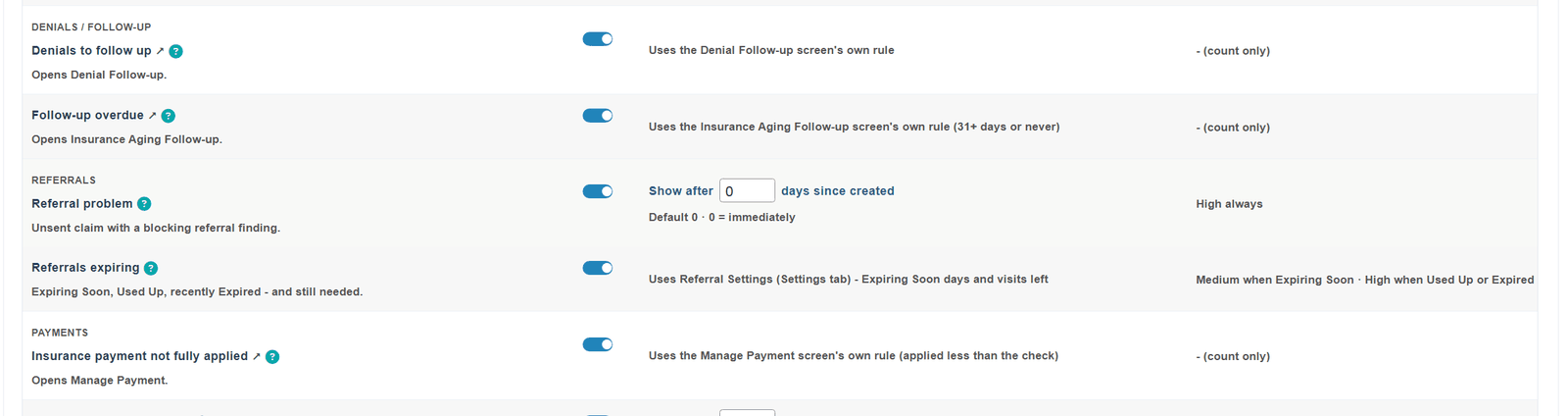
Denials to follow up ↗
Opens Denial Follow-up. · link, count only
- Counts: claims with a denial that still carry an insurance balance — the list Denial Follow-up opens with.
- Leaves the count when: Denial Follow-up no longer lists it (the balance is cleared or the denial removed).
- Example: 6 denied claims still owe money → the Alert Center shows 6; clicking opens Denial Follow-up with those 6.
- On the claim: each of those claims also shows it in its summary's Alerts, for example Denied 10/12/2026 - CO-97 · $120.00 insurance balance left · work it on Denial Follow-up.
Follow-up overdue ↗
Opens Insurance Aging Follow-up. · link, count only
- Counts: claims with an insurance balance and no follow-up note in 31 days or more, or never followed up.
- Leaves the count when: a follow-up note is added, or the balance is cleared.
- Example: a claim last followed up on 08/20 enters the count on 09/20. Adding a follow-up note today takes it out.
Referrals
Referral problem
Unsent claim with a blocking referral finding. · Show after 0 days since created · High always
- Listed when: an insurance claim not sent yet has a referral finding that blocks it — Missing, Cancelled, Out of range, Exceeded or Wrong insurance — the same checks as the red referral banner on the claim. Since is the day the claim was created.
- Leaves when: the referral is fixed (no blocking finding left) or the claim is sent. A different set of findings starts it again as Open.
- Always High: a claim with a referral problem will be denied if it goes out as it is.
Example
A claim created on 09/28 has a date of service after the referral's end date. It is listed at once under Referral problem, High, with the reason Out of range. Enter the new referral on the patient and the claim leaves the list.
Referrals expiring
Expiring Soon, Used Up, recently Expired - and still needed. · no day number · Medium when Expiring Soon · High when Used Up or Expired
- Uses the Referral Settings on the Settings tab, not a number here: Expiring Soon - days before end (default 14) and Expiring Soon - visits left (default 1).
- Listed when: a referral is Expiring Soon, Used Up, or Expired in the last 30 days — and it is still needed (it has been used, or the patient has an unbilled encounter on that insurance) — and no new referral has been saved to replace it.
- Leaves when: a referral that replaces this one is saved, or the referral is cancelled.
Example
Referral Settings are 14 days / 1 visit. A referral ends on 10/06 with 3 of its 10 visits used. On 09/22 (14 days before the end) it becomes Expiring Soon and is listed as Medium. On 10/07 it is Expired and turns High. It stays until 11/05 (30 days after the end) unless a replacement referral is saved first.
Authorizations
Authorization problem
Unsent claim with a blocking authorization finding. · Show after 0 days since created · High always
- Listed when: an insurance claim not sent yet has an authorization finding that blocks it — Missing, Cancelled, Denied, Out of range, Exceeded or Wrong insurance — the same checks as the red authorization banner on the claim. Since is the day the claim was created.
- Leaves when: the authorization is fixed (no blocking finding left) or the claim is sent. A different set of findings starts it again as Open.
Example
A claim created on 10/16 bills an hour of 97530 past the 4 hours approved. It is listed at once under Authorization problem, High, with the reason Exceeded. Raise the allowed hours on the authorization (or add the new one) and the claim leaves the list.
Authorizations expiring
Expiring Soon, Used Up, recently Expired - and still needed. · no day number · Medium when Expiring Soon · High when Used Up or Expired
- Uses the Authorization Settings on the Settings tab, not a number here: Expiring Soon - days before end (default 14) and Expiring Soon - % of the limit left (default 20).
- Listed when: an authorization is Expiring Soon, Used Up, or Expired in the last 30 days — and it is still needed (an encounter is linked to it, or the patient has an unbilled encounter on that insurance) — and no later authorization for the same procedure has been saved on that insurance profile.
- Leaves when: such a later authorization is saved, or the authorization is cancelled. Notes go to the authorization's own Notes; the side panel shows its renewal task.
Example
An authorization allows 12 visits from 10/01 to 12/31. When the 10th visit is saved it becomes Expiring Soon (2 left is 20% or less) and is listed as Medium; at the 12th it is Used Up and turns High.
Payments
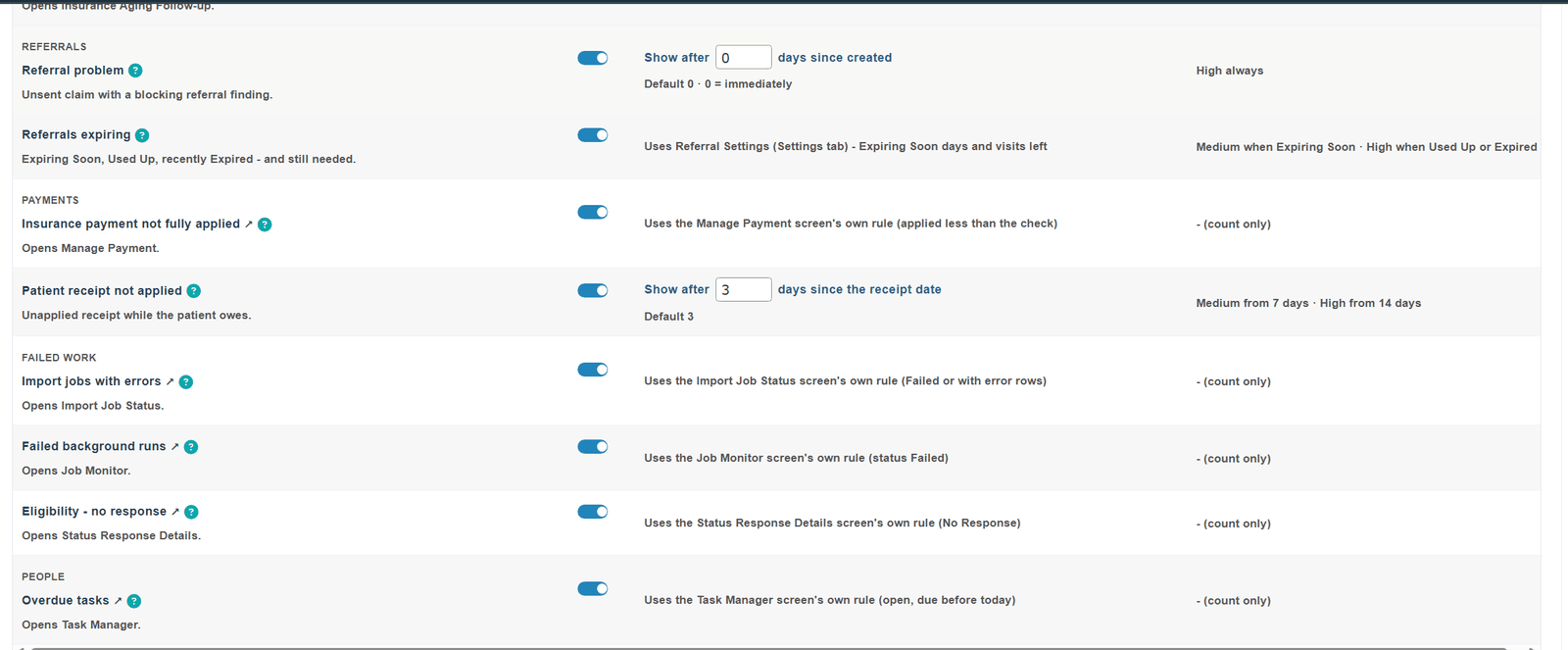
Insurance payment not fully applied ↗
Opens Manage Payment. · link, count only
- Counts: insurance payment batches whose applied amount is less than the check amount — including a batch with nothing applied yet. A batch applied for more than the check is not counted.
- Leaves the count when: the whole check amount is applied.
- Example: a $1,200.00 check with $900.00 posted to claims is counted until the last $300.00 is applied.
Patient receipt not applied
Unapplied receipt while the patient owes. · Show after 3 days since the receipt date · Medium from 7 days · High from 14 days
- Listed when: a patient receipt still has money not applied, and the same patient owes on a claim. Since is the receipt date; the amount is what is still unapplied.
- Leaves when: the receipt is applied in full, or the patient no longer owes on any claim.
Example
A $50.00 receipt is taken on 09/20 while the patient owes $120.00. It is listed on 09/23 (Low), Medium 09/27, High 10/04. Apply it to the claim and it leaves the list.
Insurance balance, no next insurance
Insurance paid or denied, a balance is left and there is no other insurance to bill. · Show after 0 days since the last insurance posting · Medium from 30 days · High from 60 days
- Listed when: an insurance payment is posted on the claim (by hand, from a file or from an ERA), the claim still has an insurance balance, and the patient has no insurance after the one that paid (no secondary in force on the date of service). Denied claims are included. Since is the last insurance posting; the amount is the insurance balance.
- Leaves when: the claim's insurance balance is 0 - adjusted, written off, moved to the patient or paid.
- A claim sent on to a secondary is not listed: the secondary is billed for it.
Example
An ERA pays $300.00 of a $450.00 claim and leaves $150.00 under a reason code the practice has not mapped; the patient has one insurance. The claim is listed at once (Low), Medium after 30 days, High after 60. Adjust the $150.00 (or move it to the patient) and it leaves the list.
ERA posting alerts ↗
Opens ERA Posting Alerts. · link, count only
- Counts: problems found while posting ERAs, such as a claim not matched, a posting that failed or an insurance created, whose status still counts as open. This is the list ERA Posting Alerts shows on All Open.
- Leaves the count when: the alert's status is set to one that counts as closed (Resolved, Archived or one of the practice's own).
- Example: an ERA has 3 claims that could not be matched → the Alert Center shows 3. Clicking it opens ERA Posting Alerts on All Open; mark each one Resolved once it is posted by hand, and the count drops.
Failed work
Import jobs with errors ↗
Opens Import Job Status. · link, count only
- Counts: import jobs with status Failed, or that finished with error rows, any date.
- Leaves the count when: the job is no longer on Import Job Status. Importing the file again adds a new job — the old one still counts.
- See Import Job Status.
Failed background runs ↗
Opens Job Monitor. · link, count only
- Counts: background runs — statements, eligibility, claim status, imports and other jobs — with status Failed, any date.
- Leaves the count when: Job Monitor no longer lists it as Failed. Running the job again adds a new run.
Eligibility - no response ↗
Opens Status Response Details. · link, count only
- Counts: eligibility checks closed as No Response — sent, but no 271 came back within 3 days — from every job, any date.
- Leaves the count when: the check is no longer No Response. Checking again adds a new row.
People
Overdue tasks ↗
Opens Task Manager. · link, count only
- Counts: the practice's active tasks that are Open or In progress with a due date before today — one count for the whole practice.
- Leaves the count when: the task is completed or cancelled, or its due date is moved on.
- Example: a task due 09/28 and still Open is counted from 09/29.
Steps: change a setting
- Go to Master Setup → Practice Setup and open the Alert Center tab.
- To stop seeing an alert, switch Show off. The row turns grey.
- To delay an alert, type the number of days in Show after. It must be between 0 and 3650.
- Click Save.
The change shows the next time the Alert Center is opened or Refresh is clicked. Each change is recorded in the practice's Event Log — for example Never billed: show after 7 → 10 days.
Restore defaults switches every alert back on, puts back every default day number and clears the left-out billing statuses. Nothing changes until you click Save.
Common problems
| You see | Why | What to do |
|---|---|---|
| Never billed: enter a number of days from 0 to 3650. | The day number is blank, negative or too large. | Enter a number from 0 to 3650. |
| No alert types are switched on. in the Alert Center | Every Show switch is off. | Switch on the alerts you want here. |
| An alert I switched on is not in the Alert Center | Its items are younger than Show after, or the Alert Center was open before you saved. | Click Refresh in the Alert Center; lower the day number if needed. |
| A claim is shown as Low although Show after is 0 | Severity comes from the item's age, not from the day number. | Nothing to do — it turns Medium and High as it ages. |
| Practice setup cannot be changed for demo practices | This is a demo practice. | Ask an administrator. |
Related
- Using the Alert Center — with an example row of every alert · Practice Setup · Settings — Referral Settings
- Import Job Status